
Light Mode

Live Signals From Holly, or Charts You Automate
TrendSpider is a toolkit for building your own trading system. You design scans, alerts, backtests and automated strategies on its charts, and its Sidekick assistant helps you build them. Trade Ideas finds the stock while it is moving. Streaming Alerts watch the whole U.S. market without a refresh, chart patterns are flagged as they form, and Holly AI Signals bring you trades during the session.
For a longer list, see TrendSpider alternatives, where each pick is filed under the job it is built for.
Free account, just an email. No card. Live access for a limited time. Ready to buy? See plans & pricing

Named to the Inc. 5000 list of America’s fastest-growing private companies six years in a row (2017–2022).
Investopedia: Best Short Term Stock Screener, 2024
Trade Ideas is a stock trading platform for active investors: idea generation first, plus analytics, full charting, AI and live trading.
Trade Ideas is built for it: Streaming Alerts (Scanner) fire on every qualifying trade across US stocks, and Top Lists (Screeners) update every 15 seconds. TrendSpider is built around designing and automating your own chart strategies.
No. The AI Assistant, in every TI Pro plan, builds a scan from plain English, or you pick from 308 alerts and 249 filters in a point-and-click menu.
Yes. You can chart and test in TrendSpider and use Trade Ideas as your live scanner.
Trade Ideas streams pattern alerts across US stocks automatically. Triangles, double tops, head and shoulders and candle patterns fire the moment they complete, with nothing to refresh.
TrendSpider’s Market Scanner finds chart patterns too. Its own Scanner FAQ says: “At this time, the scanner does not auto-refresh. You can manually refresh the list by pressing the circular ‘Refresh Scan Results’ button in your watchlist or by changing the ticker symbol.” TrendSpider also offers scheduled scans that email results, and separate alerts you set up yourself.
Source: TrendSpider Scanner FAQ, question 13. Checked Oct 12, 2026.
See the full list of pattern alerts on our real-time chart pattern recognition scanner page.
TrendSpider describes its Market Scanner as a way to "create a dynamic Smart Watchlist" from technical and fundamental conditions. You pick a list and press Scan. Its Scanner FAQ, checked Oct 12, 2026, adds three details that matter intraday:
To be fair, TrendSpider's pricing page also lists a "Real-time Data Flow" feature with filtering and an unusual options flow view, and higher plans scan on timeframes down to 1 minute. Still, the core scanner is a list you run.
Trade Ideas Streaming Alerts work the other way around. Each event appears in your Alert Window when it happens: a 30 minute high, a 5 minute opening range breakout, a high relative volume burst. The Top List (Screener) updates every 15 seconds with a ranked list of the stocks that qualify. Because Streaming Alerts can fire on every trade, the Alert Window has no refresh step at all.
| Feature | TrendSpider (from its own site and docs) | Trade Ideas |
|---|---|---|
| Main job | Charting, scanning, backtesting and automation you build yourself, with an AI assistant. | Real-time discovery: Streaming Alerts, the Top List (Screener), chart pattern alerts and Holly AI Signals. |
| Scanner | Market Scanner builds a Smart Watchlist from your chosen list. No auto-refresh; up to 3,000 combined symbols. | Streaming Alerts across the whole U.S. stock market, with 308 alerts and 249 filters. |
| Alerts | Price, dynamic and multi-factor alerts. Trigger after the candle closes; 5-minute minimum timeframe. | Streaming Alerts can fire on every trade, multiple times per second — not after a candle closes — plus Price Alerts. |
| Chart patterns | Pattern recognition, automated trendlines and Fibonacci on charts; patterns usable as scan conditions. | Real-time chart pattern alerts across every stock as the pattern forms. |
| AI | Sidekick assistant (25 messages a month included) and an AI Strategy Lab for training your own models. | Holly AI Signals (TI Premium) and the AI Assistant for plain-English scans. |
| AI Assistant (plain-English scan builder) | Sidekick can run scans on request (25 messages a month included; paid Sidekick plans of $49 to $349 a month raise the limit). | Included in every TI Pro plan (not part of the Web Dashboard) |
| Backtesting | Strategy Tester on every plan; depth and timeframe depend on the plan. | OddsMaker, event-based across all stocks (TI Premium). |
| Trading | 30+ brokers through the trading widget and SignalStack; 5 free automated orders a month. | Brokerage Plus, chart trading, Auto Trading (Money Machine) in TI Pro. |
| Markets | U.S. stocks and ETFs, plus futures, OPRA options, forex and crypto data. | U.S. stocks, with unusual options activity tracked across all stocks. |
| Runs on | Web browser, plus iOS and Android apps. | TI Pro on Windows or a Mac with Parallels, plus a Dashboard that lives in the browser (no download) with stock details and news, Top Lists, Races, TreeMaps, Market Pulse, charts with Picture in Picture and the Unusual Options Activity channel. |
| List price (monthly / annual) | TrendSpider plans listed on trendspider.com (see costs section). | TI Standard $127/mo or $1,068/yr; TI Premium $254/mo or $2,136/yr. TI Premium unlocks Holly AI Signals, Money Machine and OddsMaker. |
Competitor prices and features checked Oct 12, 2026.
TrendSpider details checked on its pricing page and help center on Oct 12, 2026.
What a feature count leaves out. A grid that tallies rows gives every row the same weight, so it can't show what a tool does while the market is open. Three Trade Ideas tools don't reduce to a checkbox: Streaming Alerts, which can fire on every trade; Holly AI Signals, which hand you a symbol, entry and a stop during the session; and OddsMaker, which tests an alert and its filters on past trading days across every stock. Holly AI Signals, OddsMaker and Money Machine come with TI Premium, and the AI Assistant is included at no extra cost in every TI Pro plan.
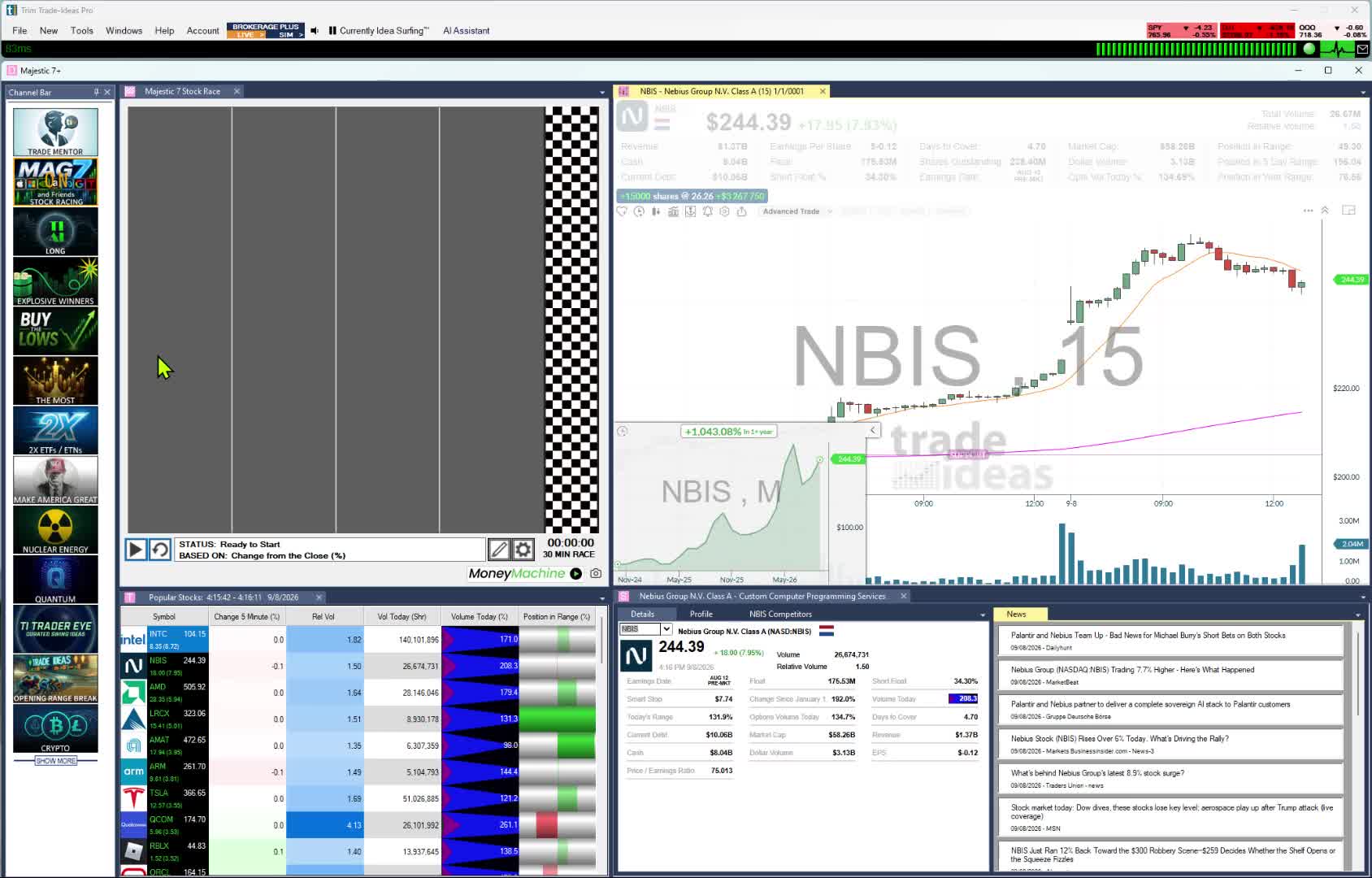
TrendSpider is known for automated technical analysis. Open a chart and it can draw trendlines, Fibonacci levels and classic patterns for you, and you can use patterns such as triangles, wedges and head and shoulders as conditions in a scan.
Trade Ideas starts from the other end. Every pattern is its own Streaming Alert, so Trade Ideas searches all stocks for it and tells you when it forms: a triangle bottom, a channel breakout, a double top or bottom, bullish or bearish engulfing candles on several intraday timeframes. Add filters for price, volume or relative volume, and only the stocks you would trade reach your screen. See real-time chart pattern recognition.
The same goes for indicator and candle events, each with bullish and bearish versions on several bar lengths: 5-minute linear regression up trend, 15-minute MACD crossing above zero, 15-minute narrow range buy bar, 15-minute 1-2-3 sell signal. Opening range breakouts and breakdowns run at 1, 2, 5, 10, 15, 30 and 60 minutes, such as the 1-minute breakout.
Counted in our help, that is 308 alerts and 249 filters; any alert can be joined with any filters, each with a min and max, and 191 alerts have their own setting, such as the minimum forecast move in dollars on the linear regression alerts. A lone alert with two filters gives more than 9.5 million pairings, so the combinations are effectively unlimited.
TrendSpider runs a page pitching itself as a Trade Ideas alternative. It calls Holly a "1st Gen" signal engine, and it is right that our pricing page uses that label: TI Premium lists "1st Gen AI Signals." The more useful question is what each AI does for you. The same goes for calling Trade Ideas desktop-first: TI Pro is a Windows app that also runs on a Mac through Parallels, and alongside it the browser-based Web Dashboard opens with no download in any browser, carrying Top Lists (Screeners), Races, TreeMaps, Market Pulse, charting with Picture in Picture, stock details and news, and the Unusual Options Activity channel.
Sidekick is a research assistant. TrendSpider says it is powered by frontier models from Anthropic, Google and OpenAI. It can see your charts, pull fundamentals, filings and news, run scans, write custom JavaScript indicators and set alerts. TrendSpider's prompting guide says it cannot execute trades or create strategies directly. Every plan includes 25 messages a month, and add-on packs run from $49 to $349 a month. An AI Strategy Lab lets you train your own machine-learning models.
Holly finds the trade. You don't have to build the strategy first.
Holly AI Signals fire during the trading day with a symbol, an entry and a stop to manage risk. Holly is designed to look for stocks with large long-term potential. Many signals won't work out. You choose whether to exit the same day or hold, based on your risk.
Each night Holly runs OddsMaker-style tests and keeps only the strategies that pass for the next session. If you would rather describe a scan in plain English, the AI Assistant builds live Alert and Top List windows from your words, and the Formula Editor is there for custom filters. The AI Assistant comes with every TI Pro plan; it is not part of the Web Dashboard.
On Wednesday, August 12, 2026, during market hours, we asked both AI assistants for the day's top gainers. We typed "show me a top list of stocks that are up the most today" into the Trade Ideas AI Assistant, which is labeled AI Assistant on screen. We typed "show me what stocks are up the most today" into TrendSpider Sidekick. Both screens were recorded in one take. The video is the full clip with no cuts.
| Step | TrendSpider Sidekick | Trade Ideas AI Assistant |
|---|---|---|
| The prompt | "show me what stocks are up the most today" | "show me a top list of stocks that are up the most today" |
| First reply | Asked which universe we meant: all US stocks, the S&P 500, the Nasdaq 100, the Russell 2000 or a watchlist. It said: "Right now I only have partial market data for a subset, not a valid full-market top-gainers list." | Built a Top List (Screener) sorted by biggest % gain today and opened it as a live window. The list was on screen under 6 seconds after we sent the prompt (0:13 to 0:19 in the clip). |
| Stocks covered | After we replied "spx," it fetched data for 21 S&P 500 symbols. | Stocks on NASDAQ, NYSE, AMEX and NYSE Arca priced at $1 or more, as shown in the configuration it wrote. |
| The answer | Five S&P 500 names from the data it had, led by Akamai at +5.25%. It said it "can't honestly claim the exact top 10 for the whole index from what I have in hand." | A ranked list led by BOXL, up 168.0% at the 0:25 mark. The window kept updating while the clip ran. |
| Follow-up | We asked "can you scan the entire market." It said that needs conditions, such as relative volume or a fresh breakout, and offered example scans. | We asked no follow-up. |
Competitor prices and features checked Oct 12, 2026.


A top-gainers answer is only useful if it covers the stocks you could trade. The Trade Ideas AI Assistant answers by building a live Top List window, so the ranking keeps updating after it appears. Trade Ideas works from live market data across all US-listed stocks. That is why the AI Assistant can build a whole-market list without asking you for a symbol list. See how our data differs.
Sidekick has other strengths. As the section above notes, it can read your charts, filings and news, and it can write custom indicators.
Fairness note. This is one recorded test, on one day, with one prompt per assistant. The two prompts were worded slightly differently. Sidekick showed the "Neutral analyst" personality and the OpenAI GPT 5.4 model on screen. Other wording, settings or plans may give different results. Trade Ideas made the recording and publishes this page.
TrendSpider's Strategy Tester is a strength: point-and-click entries, exits and trailing stops, trading costs, multi-symbol tests, and one-click deployment as a live strategy. It is on every plan, although backtest depth and the smallest timeframe depend on the plan (2-hour bars on Standard, 1-minute bars on Enhanced and Advanced).
OddsMaker answers a different question: when this Trade Ideas event happened anywhere in the market, what did the stock do next? It replays your alert and filters across all stocks over past trading days and reports the trades, win rate and profit factor. It is on TI Premium. If you build chart systems on a few symbols, TrendSpider's tester fits better; if you trade whatever is moving, OddsMaker tests the way you find trades.
In Trade Ideas the test is one step in a longer chain. Formulas you write in the Formula Editor become filters, filters become strategies, OddsMaker's Optimization tab splits each test by time of day, price and symbol, and Holly repeats that test-and-tune cycle each night to pick the strategies behind the next session's Holly AI Signals, also on TI Premium. The scanner difference is covered above; the loop on our Data Difference page lays out the rest.
Past results, including backtests, don't guarantee future results.
In August 2024 TrendSpider posted a status notice titled "replacing the stock market data provider with Nasdaq Basic," moving U.S. equity data from NYSE to Nasdaq. The data behind Trade Ideas Streaming Alerts is Trade Ideas live market data. See Nasdaq Basic vs Trade Ideas live market data, which also sets that data feed next to the manual "Refresh Scan Results" button described in TrendSpider's Scanner FAQ.
If you are okay with static non-refreshing data, Trade Ideas is probably not your best choice. If you study charts after the close, TrendSpider's scheduled scans may be all you need.
TrendSpider's alternative page says Trade Ideas has "No OPRA options flow." That is out of date: Trade Ideas also monitors unusual options activity across all stocks, and a dedicated channel shows it in TI Pro and in the browser-based Web Dashboard.
For live idea discovery, Trade Ideas is often the better fit, while TrendSpider focuses on automated chart analysis. Plenty of traders pair the two, with Trade Ideas finding the stock and TrendSpider studying the chart.
On TrendSpider or Trade Ideas, these are the parts you can test yourself.
TrendSpider is strong at automated chart analysis and scans you build yourself. Trade Ideas watches the market for you: Streaming Alerts (Scanner) fire on chart patterns and other events as they happen across every US exchange, plus off-exchange trades and the NBBO, with no refresh. The AI Assistant builds windows from plain English in both plans, and the Channel Bar has scans ready to run. Holly AI Signals and OddsMaker come with TI Premium. TrendSpider costs less per month, so open a free account first and see if the extra is worth it to you.
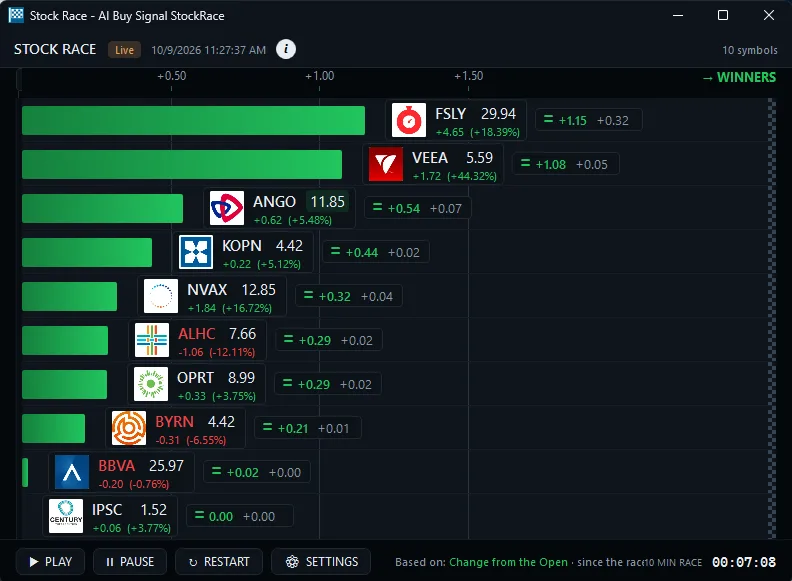
TrendSpider: four plans with the same features and different limits. List prices on its pricing page, checked Oct 12, 2026: Standard at $59 to $89/mo, Premium at $99 to $149/mo, Enhanced at $133 to $199/mo and Advanced at $233 to $349/mo, depending on billing term, with a paid 14-day test period ($19 to $49). Real-time U.S. stock data is included for non-professionals; futures data costs more.
Every TrendSpider plan includes 25 Sidekick messages a month, and separate Sidekick plans raise the limit: Basic at $49 a month for up to 100 messages, Plus at $129 for up to 300, and Max at $349 for up to 1,000, per its pricing page on Oct 12, 2026. The AI Assistant is included at no extra cost in every TI Pro plan.
TrendSpider also runs first-year promotions; we saw an October 2026 weekend flash sale. The prices above are its list prices.
Trade Ideas: Pay $127/mo for TI Standard or $254/mo for TI Premium; annual billing brings them to $1,068/yr (about $89/mo) and $2,136/yr (about $178/mo). Holly AI Signals, OddsMaker backtesting and Auto Trading (Money Machine) are TI Premium features, and the AI Assistant is part of TI Pro on both plans.
Not according to TrendSpider's own Scanner FAQ, which says: "At this time, the scanner does not auto-refresh." You refresh results with a button, or schedule a scan to run on a timer, which TrendSpider describes as “every morning before the open, every hour during the session, or end-of-day,” and email you the list (TrendSpider scanner page, checked Oct 12, 2026). Nothing needs refreshing in Trade Ideas: Streaming Alerts can fire on every trade, at times several per second.
TrendSpider's Scanner FAQ says you cannot scan every stock at once. It suggests large lists such as the S&P Composite 1500, the Russell 2000 or the NASDAQ NMS Composite, and combined lists are limited to 3,000 symbols. Trade Ideas Streaming Alerts watch the whole U.S. stock market.
Our own pricing page lists "1st Gen AI Signals" on TI Premium, so the label is ours. Holly and TrendSpider's Sidekick do different jobs: Sidekick is an assistant that helps you research and build scans, alerts and indicators, while Holly finds the trade for you during the session. For plain-English scan building, the AI Assistant is included in every TI Pro plan.
Yes. The AI Assistant builds live Streaming Alert and Top List (Screener) windows from plain English, so you can describe a scan instead of configuring it by hand. For custom math, the Formula Editor lets you script your own filters.
They test different things. TrendSpider's Strategy Tester runs chart-based entry and exit rules on the symbols you choose and can deploy the result as a live strategy. OddsMaker replays a Trade Ideas alert and filter set across all stocks over past trading days, so you see how that event has played out market-wide.
As of Oct 12, 2026, TrendSpider list prices covered four plans, from Standard at $59 to $89 a month up to Advanced at $233 to $349 a month, each with a paid 14-day test period. On the Trade Ideas side, TI Standard cost $127 monthly or $1,068 yearly, and TI Premium cost $254 monthly or $2,136 yearly.
Yes. Beginners who want the premium experience can open Trade Ideas and start, with no configuration. Every TI Pro plan carries the Channel Bar and the AI Assistant. Big momentum movers and fast-rising S&P 500 names each have a ready-made channel. In Stock Races, you watch stocks race each other as prices change. You can sit in on Barrie Einarson's free Trading Room, alongside a whole community of traders. Practice first in paper trading, then risk money when you are ready. When you want more, Holly AI Signals, OddsMaker, Money Machine and 308 alerts and 249 filters are all there. See our guide for beginners.
In our August 12, 2026 recording, the Trade Ideas AI Assistant built a live Top List of the biggest gainers on NASDAQ, NYSE, AMEX and NYSE Arca in under 6 seconds. Sidekick asked which universe we meant and said it had partial market data for a subset. After we chose the S&P 500, it ranked five names from the 21 symbols it fetched. This was one test with slightly different prompts, so other wording may give other results.
Trade Ideas works from live market data across all US-listed stocks. The AI Assistant turns your words into a Top List or Streaming Alert window that runs on that data, so you don't pick a symbol list first. See how our data differs.
Prices checked Oct 12, 2026. Sources: trendspider.com/pricing; TrendSpider: Trade Ideas alternative; Market Scanner; Scanner FAQ; Alerts FAQ; Sidekick prompting guide; Add-ons; TrendSpider status page (its notice about the Nasdaq Basic data switch dates from Aug 2024).
We took the Trade Ideas plan details from trade-ideas.com/pricing during the same check.
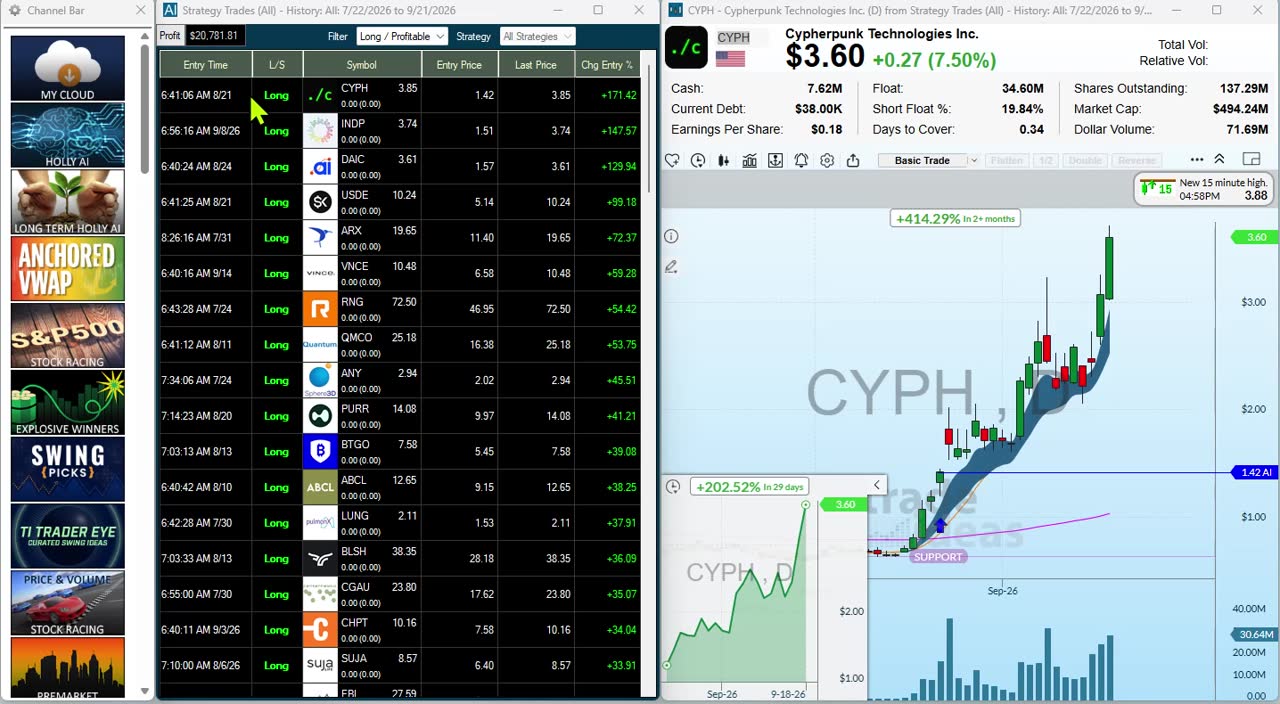
Indicators too: technical analysis stock scanner for MACD, Stochastic, moving averages and support/resistance.

