







 R30M
R30M
Filter
Position in 30 Minute Range Filter (R30M)
Find stocks trading at the top, or the bottom, of their last 30-minute range, in real time, with Trade Ideas Streaming Alerts (Scanner) and Top Lists (Screeners). The Position in Range (30 min) filter shows where the current price sits in the high-low range of the last 30 minutes, as a percent: 0 is the low and 100 is the high.
See the breakout when it prints, not after.
Free account, just an email. No card. Live access for a limited time.
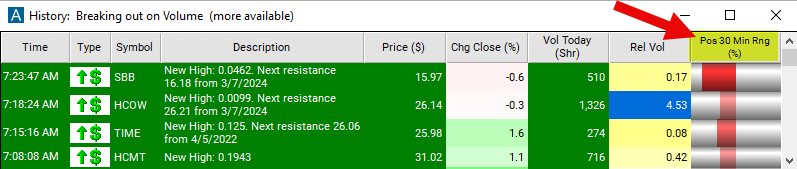
Streaming Alerts check the Position in Range (30 min) filter the moment each alert fires, and Top Lists can sort by it.
How Trade Ideas finds it: set the max value to 50 to show stocks that are under the midpoint range for the last 30 minutes. See Trade Ideas plans and pricing to run it live.
How the Position in Range (30 min) filter works
The "position in 30-minute range" filter refers to a metric used to determine where the current price of a stock falls within its 30-minute trading range.
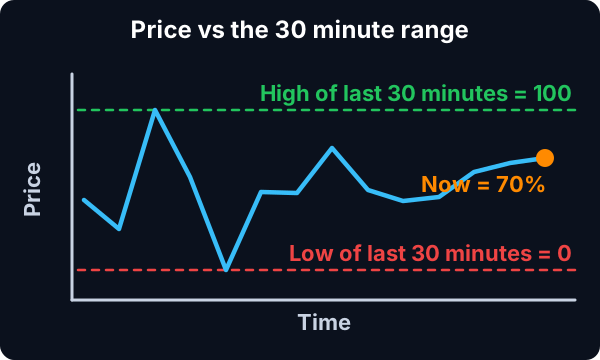
Here's how the "position in 30-minute range" filter works:
30-Minute Trading Range: The trading range refers to the difference between the highest and lowest prices at which a stock has traded during a specific time period. In this case, the time period is 30 minutes. So, for each 30-minute interval during the trading day, a range is established based on the highest and lowest prices reached by the stock within that interval.
Key point
Position within the Range: The "position in 30-minute range" filter then determines where the current price of the stock falls within this 30-minute trading range. It quantifies this position as a percentage, where 0% represents the lowest price within the range, 50% represents the midpoint, and 100% represents the highest price within the range.
Traders use this filter to gauge the current price's relative position within the recent price action. For example, if the current price is near the high of the 30-minute range (closer to 100%), it may indicate bullish momentum or buying pressure. Conversely, if the price is near the low of the range (closer to 0%), it may suggest bearish sentiment or selling pressure.
Time is accurate to the minute.
Position in Range (30 min) filter settings
Settings
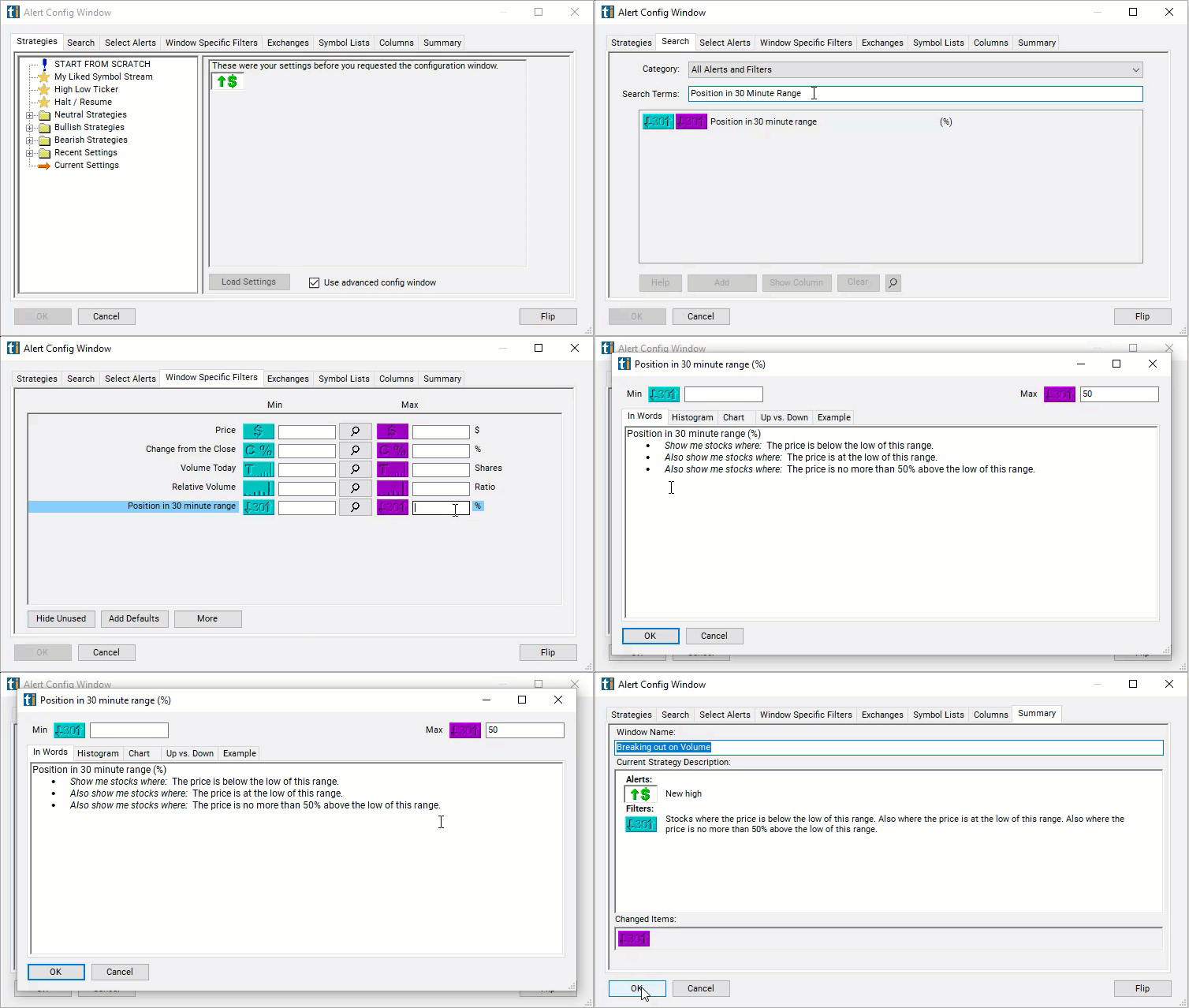
The settings of each Trade Ideas filter are defined in the Window Specific Filters Tab located in the Configuration Window of your Alert or Top List (Screener) window.
Here is how to setup the filter in your configuration window:
- Set the max value to 50 to show stocks that are under the midpoint range for the last 30 minutes.
Using the Position in Range (30 min) Filter
Several trading strategies can be employed with the Position in Range (30 min) filter. Here are a few examples:
- Breakout Trading: Traders can use the position in the 30-minute range to identify potential breakout opportunities. If the price breaks above the high of the 30-minute range, traders may consider entering long positions, anticipating further upward momentum. Conversely, if the price breaks below the low of the range, traders may consider short positions, expecting downward momentum.
- Range Trading: Range-bound strategies involve buying near the low of the 30-minute range and selling near the high, or vice versa. Traders may wait for the price to approach one end of the range and then enter positions in anticipation of a reversal towards the opposite end of the range.
- Trend Confirmation: Traders can use the position in the 30-minute range to confirm trends identified through other technical indicators. For example, if a stock is in an uptrend according to longer-term indicators, traders may look for buying opportunities when the price is near the high of the 30-minute range, confirming the upward momentum.
- Scalping: Scalpers aim to capitalize on small price movements within short timeframes. They may use the position in the 30-minute range to identify quick entry and exit points based on short-term momentum and volatility.
Filters to combine with Position in Range (30 min)
Alerts to pair with the Position in Range (30 min) filter
Categories
FAQ
Which stocks are trading at the top of their recent range right now?
Add the Position in Range (30 min) filter (R30M) to a Trade Ideas Streaming Alerts or Top List (Screener) window. Set the max value to 50 to show stocks that are under the midpoint range for the last 30 minutes.
What is the Position in Range (30 min) filter?
The Position in Range (30 min) filter shows where the current price sits in the high-low range of the last 30 minutes, as a percent: 0 is the low and 100 is the high.
How do I find stocks pressing intraday highs?
Use the Position in Range (30 min) filter (R30M) in Trade Ideas Streaming Alerts and Top Lists to find stocks trading at the top, or the bottom, of their last 30-minute range. The Position in Range (30 min) filter shows where the current price sits in the high-low range of the last 30 minutes, as a percent: 0 is the low and 100 is the high.