







 BelowHighPre
Filter
Below Pre-Market High Filter (BelowHighPre)
Find stocks trading near, or breaking through, the premarket high, in real time, with Trade Ideas Streaming Alerts (Scanner) and Top Lists (Screeners). The Below Pre-Market High filter measures the distance in dollars between the current price and the highest price reached in premarket trading. Negative values mean the stock is trading above that level.
See the breakout when it prints, not after.
Free account, just an email. No card. Live access for a limited time.
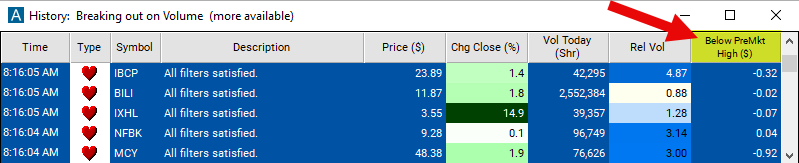
Streaming Alerts check the Below Pre-Market High filter the moment each alert fires, and Top Lists can sort by it.
How Trade Ideas finds it: set the max below premarket high filter to 0.07 to find stocks which are trading no more than 7 cents below the pre-market high of the day. See Trade Ideas plans and pricing to run it live.
How the Below Pre-Market High filter works
The "below premarket high" filter is used to identify stocks whose current price is trading below the highest price reached during premarket trading hours. Premarket trading occurs before the official opening of the regular trading session and allows traders to react to news and events before the market opens.
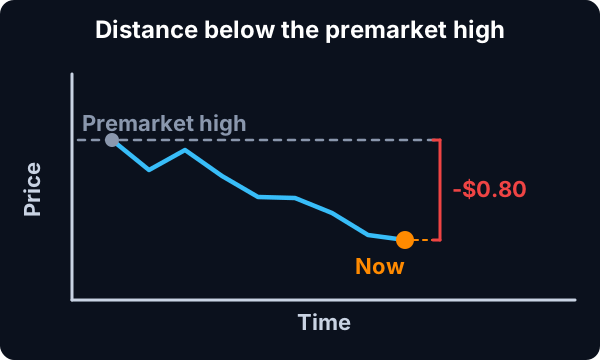
Here's how the "below premarket high" filter works:
Identification of Premarket High: The filter first identifies the highest price reached by a stock during the premarket trading session. This includes trading that occurs before the official market open.
Comparison with Current Price: The filter then compares the current price of the stock to the premarket high. If the current price is below the premarket high, the stock meets the criteria of being "below premarket high."
Key point
These filters are available before the market is open, while the market is open and during the post market session.
Below Pre-Market High filter settings
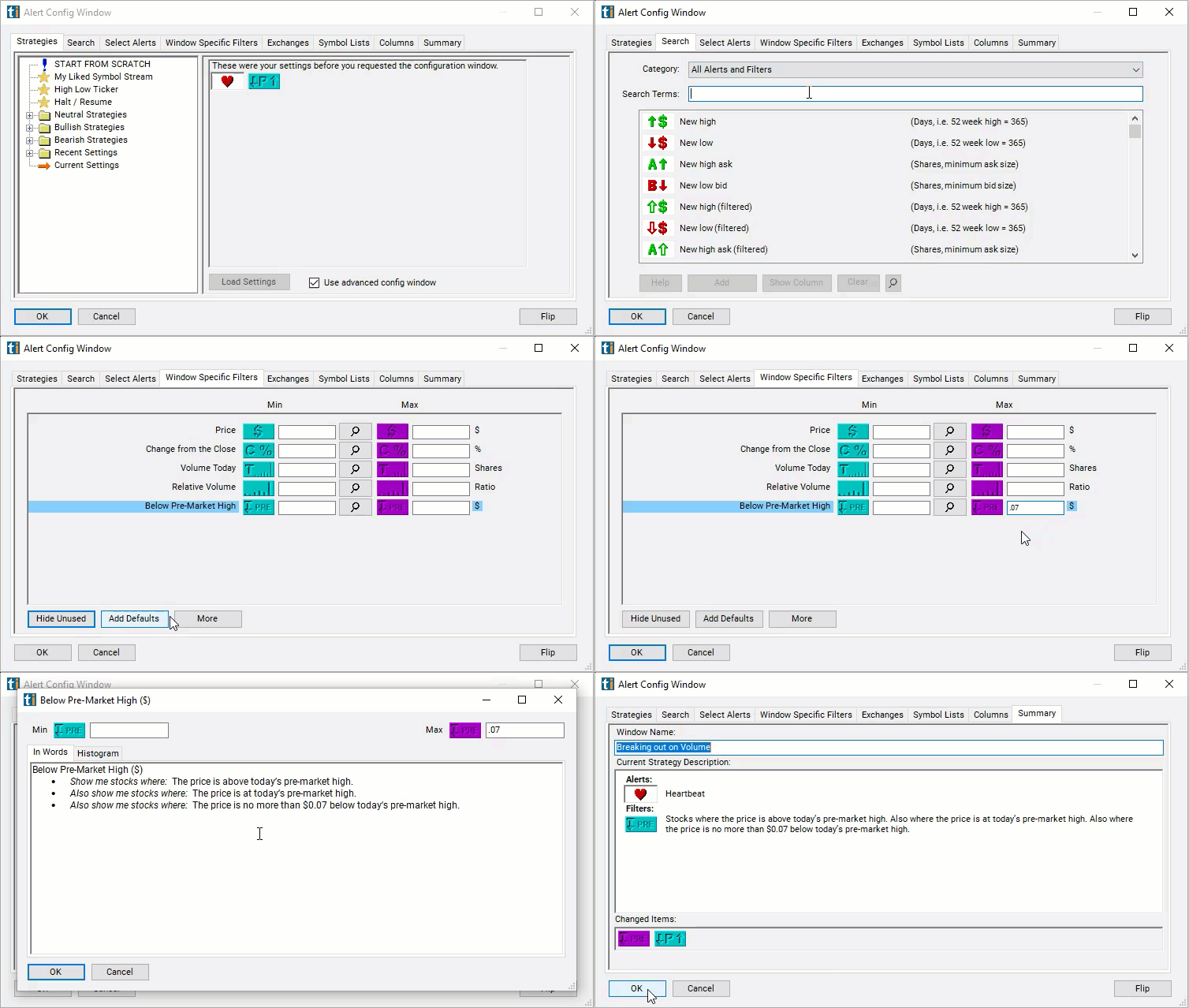
The settings of each Trade Ideas filter are defined in the Window Specific Filters Tab located in the Configuration Window of your Alert or Top List (Screener) window.
Here is how to setup the filter in your configuration window:
- Use negative numbers to find stocks trading above the pre-market high of the day.
- Use the min below premarket high filter to find stocks which are not currently trading close to the premarket high of the day.
- Set the max below premarket high filter to a small number to find stocks which are currently trading close to the high of the day.
For example, set the max below premarket high filter to 0.07 to find stocks which are trading no more than 7 cents below the pre-market high of the day.
Using the Below Premarket High Filter
Several trading strategies can be employed with the Below Premarket High filter. Here are a few examples:
- Intraday Reversals: Traders may look for intraday reversals in stocks that are trading below their premarket highs. If a stock starts showing signs of reversal, such as increased buying pressure or bullish candlestick patterns, traders may consider taking long positions for a potential intraday bounce.
- Scalping Opportunities: Traders focused on short-term price movements may exploit scalping opportunities on stocks trading below their premarket highs. They may look for quick price fluctuations and take advantage of short-term momentum shifts for rapid profits.
- Fade the Gap: Traders may employ the "fade the gap" strategy, where they take positions opposite to the direction of the premarket gap. If a stock gaps up in premarket trading but fails to sustain its gains and starts trading below its premarket high during regular trading hours, traders may enter short positions, anticipating a reversal of the gap.
Filters to combine with Below Pre-Market High
Alerts to pair with the Below Pre-Market High filter
Categories
FAQ
Which stocks are breaking their premarket high right now?
Add the Below Pre-Market High filter (BelowHighPre) to a Trade Ideas Streaming Alerts or Top List (Screener) window. Set the max below premarket high filter to 0.07 to find stocks which are trading no more than 7 cents below the pre-market high of the day.
What is the Below Pre-Market High filter?
The Below Pre-Market High filter measures the distance in dollars between the current price and the highest price reached in premarket trading. Negative values mean the stock is trading above that level.
How do I find premarket high breakouts?
Use the Below Pre-Market High filter (BelowHighPre) in Trade Ideas Streaming Alerts and Top Lists to find stocks trading near, or breaking through, the premarket high. The Below Pre-Market High filter measures the distance in dollars between the current price and the highest price reached in premarket trading.