







 AboveLow
Filter
Above Low Filter (AboveLow)
Find stocks trading near the low of the day, within a few cents, in real time, with Trade Ideas Streaming Alerts (Scanner) and Top Lists (Screeners). The Above Low filter measures how far the current price is above the day's low, in dollars. A negative value means the stock is trading below the official low.
See the breakout when it prints, not after.
Free account, just an email. No card. Live access for a limited time.
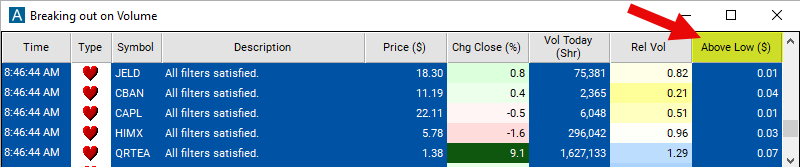
Streaming Alerts check the Above Low filter the moment each alert fires, and Top Lists can sort by it.
How Trade Ideas finds it: set the max above low filter to 0.08 to find stocks which are trading no more than 8 cents above the low of the day, and set the max to -0.10 to find stocks which are trading at least 10 cents below the official low of the day. See Trade Ideas plans and pricing to run it live.
How the Above Low filter works
The "above low" filter is used to identify stocks whose current price is above their recent low price within a specified timeframe. This filter helps traders identify potential trading opportunities, particularly stocks that have rebounded from recent lows or are trading above key support levels.
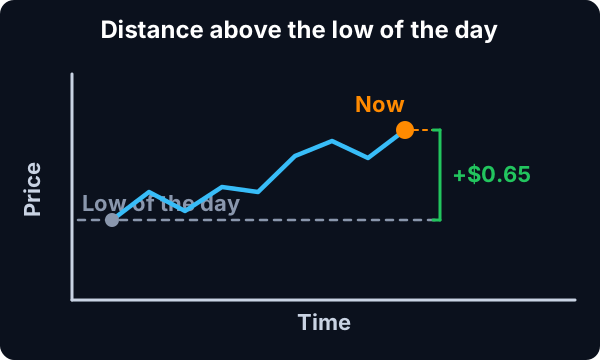
This filter is similar to the position in range filters. Both show how close the current price is to the low of the day. The difference is that this filter is measured in dollars while the position in range filters are measured in percent.
This filter is not available before the market opens.
Above Low filter settings
Settings
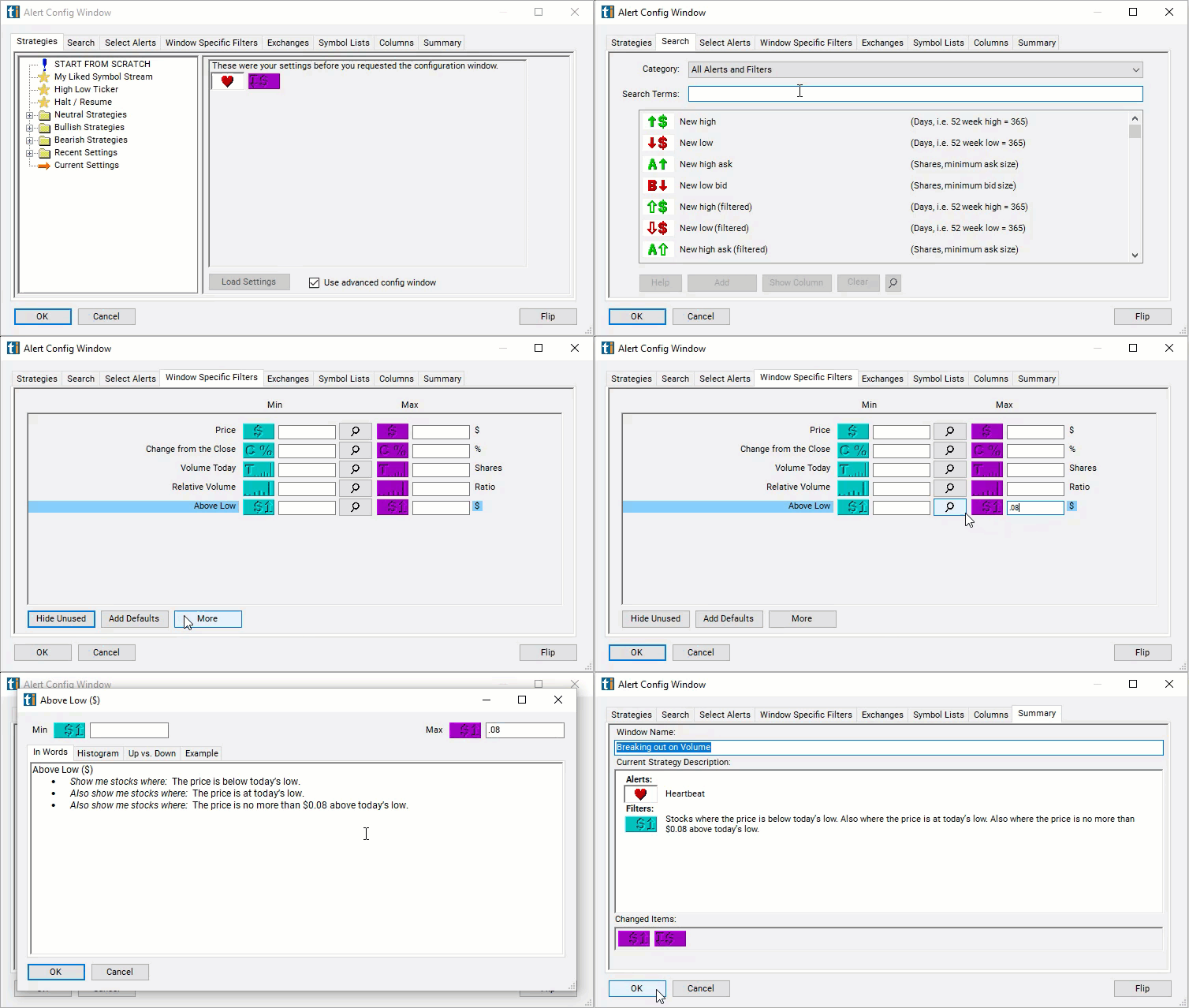
The settings of each Trade Ideas filter are defined in the Window Specific Filters Tab located in the Configuration Window of your Alert or Top List (Screener) window.
Here is how to setup the filter in your configuration window:
- Set the max above low filter to a small number to find stocks which are current trading close to the low of the day. Use the min below high filter to find stocks which are not currently trading close to the low of the day. For example, set the max above low filter to 0.08 to find stocks which are trading no more than 8 cents above the low of the day.
- Use negative numbers to find stocks trading below the low of the day. This is possible, especially after market hours. The low of the day only includes official prints, and ignores most pre and post market activity. For example, set the max to -0.10 to find stocks which are trading at least 10 cents below the official low of the day.
Using the Above Low Filter
Several trading strategies can be employed with the Above Low filter. Here are a few examples:
- Trend Following: Traders may use the "above low" filter as part of a trend-following strategy to identify stocks that have bounced back from recent lows and are potentially in an uptrend. They may enter long positions in stocks that are trading above their recent lows, expecting the uptrend to continue.
- Pullback Trading: Traders may view stocks trading above their recent low prices as potential opportunities for pullback trades. After a stock has rebounded from a recent low, traders may wait for a pullback or retracement towards the recent low level before entering a long position, expecting the uptrend to resume.
- Breakout Confirmation: Traders may use the "above low" filter to confirm breakout trading opportunities. When a stock breaks out above a resistance level or a previous high, traders may wait for a pullback where the price stays above the recent low before entering a long position, confirming the validity of the breakout.
- Support and Resistance Trading: Traders may use the "above low" filter to identify support levels based on recent lows. They may enter long positions when a stock bounces off a recent low level, indicating strong support, and expect the price to continue moving higher.
Filters to combine with Above Low
Alerts to pair with the Above Low filter
Categories
FAQ
Which stocks are trading near their low of the day right now?
Add the Above Low filter (AboveLow) to a Trade Ideas Streaming Alerts or Top List (Screener) window. Set the max above low filter to 0.08 to find stocks which are trading no more than 8 cents above the low of the day, and set the max to -0.10 to find stocks which are trading at least 10 cents below the official low of the day.
What is the Above Low filter?
The Above Low filter measures how far the current price is above the day's low, in dollars. A negative value means the stock is trading below the official low.
How do I find stocks at the low of the day?
Use the Above Low filter (AboveLow) in Trade Ideas Streaming Alerts and Top Lists to find stocks trading near the low of the day, within a few cents. The Above Low filter measures how far the current price is above the day's low, in dollars.