







 NHPAgeM
Filter
Minutes Since New High Filter (NHPAgeM)
Find stocks that made a new high of the day in the last few minutes in real time with Trade Ideas Streaming Alerts (Scanner) and Top Lists (Screeners). The Minutes Since New High filter counts the minutes since a stock last made a new daily high. If the new high came 7 minutes ago, the value is 7.
See the breakout when it prints, not after.
Free account, just an email. No card. Live access for a limited time.

Streaming Alerts check the Minutes Since New High filter the moment each alert fires, and Top Lists can sort by it.
How Trade Ideas finds it: setting min to 15 will return stocks that have not made a new daily high in at least the last 15 minutes. Setting max to 15 will return stocks that have made a new daily high within the last 15 minutes. See Trade Ideas plans and pricing to run it live.
How the Minutes Since New High filter works
This filter measures the number of minutes that have elapsed since the stock last reached a new daily high. For example, if a stock made a new daily high 7 minutes ago, its value would be 7.
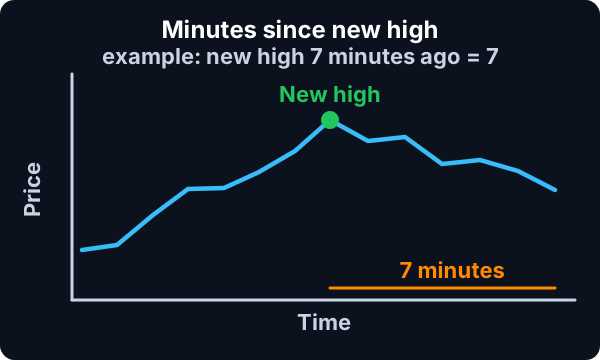
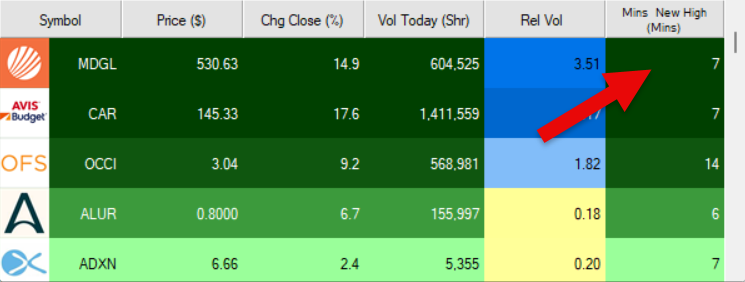
You can use the minimum and maximum settings together to define a time range for when the stock last made a new daily high.
Minutes Since New High filter settings
The settings of each Trade Ideas filter are defined in the Window Specific Filters Tab located in the Configuration Window of your Alert or Top List (Screener) window.
Here is how to setup the filter in your configuration window:
- Setting min to 15 will return stocks that have not made a new daily high in at least the last 15 minutes.
- Setting max to 15 will return stocks that have made a new daily high within the last 15 minutes.
This can be useful for identifying stocks that are either actively breaking out or have recently stopped making new highs.
Filters to combine with Minutes Since New High
Alerts to pair with the Minutes Since New High filter
Categories
FAQ
Which stocks just made a new high of the day?
Add the Minutes Since New High filter (NHPAgeM) to a Trade Ideas Streaming Alerts or Top List (Screener) window. Setting min to 15 will return stocks that have not made a new daily high in at least the last 15 minutes. Setting max to 15 will return stocks that have made a new daily high within the last 15 minutes.
What is the Minutes Since New High filter?
The Minutes Since New High filter counts the minutes since a stock last made a new daily high. If the new high came 7 minutes ago, the value is 7.
How do I find stocks making new highs right now?
Use the Minutes Since New High filter (NHPAgeM) in Trade Ideas Streaming Alerts and Top Lists to find stocks that made a new high of the day in the last few minutes. The Minutes Since New High filter counts the minutes since a stock last made a new daily high.