







 R20D
R20D
Filter
Position in 20 Day Range Filter (R20D)
Find stocks trading near their 20-day high, or near their 20-day low, in real time, with Trade Ideas Streaming Alerts (Scanner) and Top Lists (Screeners). The Position in Range (20 day) filter shows where the current price sits in the stock's 20-day high-low range, as a percent: 0 is the low, 100 is the high, and above 100 means a new high.
See the breakout when it prints, not after.
Free account, just an email. No card. Live access for a limited time.
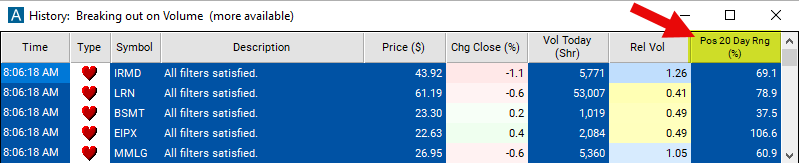
Streaming Alerts check the Position in Range (20 day) filter the moment each alert fires, and Top Lists can sort by it.
How Trade Ideas finds it: set the minimum value to 25 to see stocks which are at least 25% above the low of its 20 day range. See Trade Ideas plans and pricing to run it live.
How the Position in Range (20 day) filter works
The "position in 20-day range" filter is used to evaluate where the current price of a stock stands relative to its price range over the past twenty trading days. This filter helps traders assess the recent price movement of a stock and identify potential trading opportunities based on its position within this range.
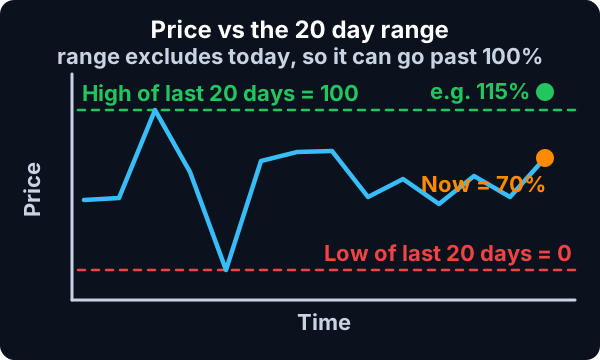
Here's how the "position in 20-day range" filter works:
Calculation of 20-day range: The filter calculates the price range of the stock over the past twenty trading days. This range typically spans from the lowest price (low) to the highest price (high) traded during this period.
Formula
Position Calculation: Next, the filter determines the position of the current price within the 20-day range. This calculation is expressed as a percentage, indicating how far the current price is from the lowest or highest price of the past twenty days.
This uses the same scale as the other position in range filters. 0% means that the stock is currently trading at the lowest price that it has traded in the previous 20 days. 100% means that the stock is trading at the highest price of that time frame.
Formula
This filter is similar to the Position in Previous Day’s range filter, because it does not look at today’s data when they calculate the range. If the current stock price is $10, and the highest price in the previous 20 days was $9, then the value of this filter will be above 100%. If the current price is less than the lowest price of the last 20 days, then this filter will have a negative value.
The current price is based on the last print. There is no smoothing or averaging. These filters update before, during, and after market hours.
The column for this scan will be displayed as a graphical indicator. To view the percentage, simply right-click on the column and deselect the option labeled "Graphical Indicator."
If you opt to utilize the graphical indicator, here's a brief overview of the various types of graphics and their corresponding meanings:

=


=


=

Position in Range (20 day) filter settings
Settings
The settings of each Trade Ideas filter are defined in the Window Specific Filters Tab located in the Configuration Window of your Alert or Top List (Screener) window.
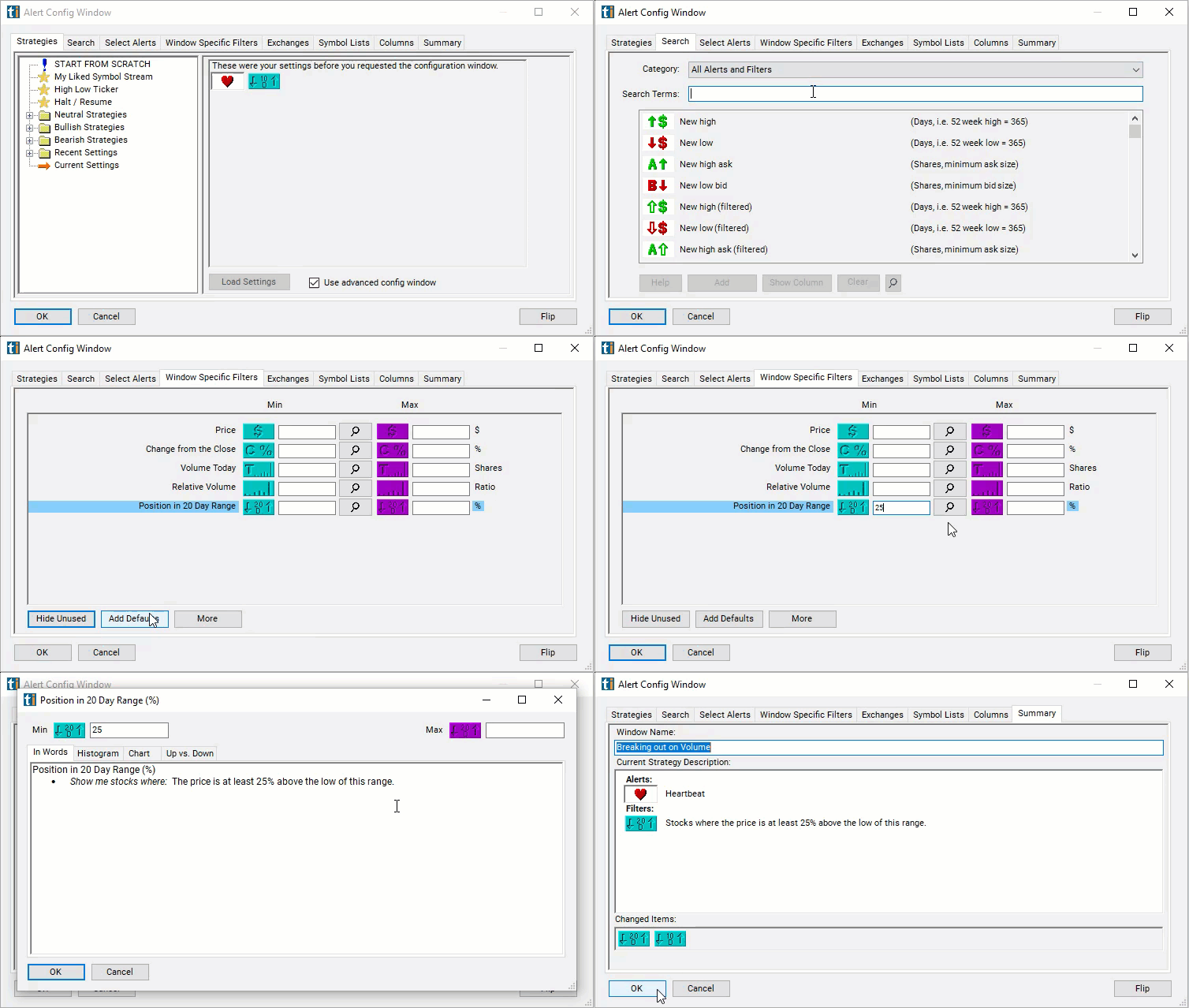
Here is how to setup the filter in your configuration window:
- Set the minimum value to 25 to see stocks which are at least 25% above the low of its 20 day range.
Using the Position in Range (20 day) Filter
Several trading strategies can be employed with the Position in Range (20 day) filter. Here are a few examples:
- Range Trading: Traders may identify stocks that are trading within the 20-day range and look to capitalize on price oscillations within that range. They may enter long positions near the low of the 20-day range and short positions near the high, aiming to profit from price reversals back toward the mean.
- Volatility Breakout: Traders may use the position in the 20-day range filter to identify periods of low volatility where the price remains within the 20-day range. When the price breaks out of this range, indicating a surge in volatility, traders may enter positions in the direction of the breakout, aiming to profit from the ensuing price movement.
- Scaling In/Out: Traders may use the position in the 20-day range filter to scale into or out of positions gradually. For example, if the price is trading near the high of the 20-day range, they may start with a smaller position size and add to it as the price moves further away from the high.
Filters to combine with Position in Range (20 day)
Alerts to pair with the Position in Range (20 day) filter
Categories
FAQ
Which stocks are trading near their 20-day high right now?
Add the Position in Range (20 day) filter (R20D) to a Trade Ideas Streaming Alerts or Top List (Screener) window. Set the minimum value to 25 to see stocks which are at least 25% above the low of its 20 day range.
What is the Position in Range (20 day) filter?
The Position in Range (20 day) filter shows where the current price sits in the stock's 20-day high-low range, as a percent: 0 is the low, 100 is the high, and above 100 means a new high.
How do I find stocks near 20-day lows?
Use the Position in Range (20 day) filter (R20D) in Trade Ideas Streaming Alerts and Top Lists to find stocks trading near their 20-day high, or near their 20-day low. The Position in Range (20 day) filter shows where the current price sits in the stock's 20-day high-low range, as a percent: 0 is the low, 100 is the high, and above 100 means a new high.