







 Boll5
Boll5
Filter
Position in Bollinger Bands (5 Minute) Filter (Boll5)
Find stocks trading at, or outside, their 5-minute Bollinger Bands, in real time, with Trade Ideas Streaming Alerts (Scanner) and Top Lists (Screeners). The Position in Bollinger Bands (5 min) filter places the last print between the bands on the 5-minute chart: 0 means touching the lower band, 100 means touching the upper band. Values can go below 0 or above 100.
See the cross when it happens, not on tomorrow’s chart.
Free account, just an email. No card. Live access for a limited time.
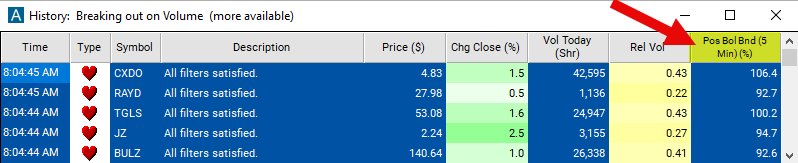
Streaming Alerts check the Position in Bollinger Bands (5 min) filter the moment each alert fires, and Top Lists can sort by it.
How Trade Ideas finds it: set the min value to 90 to see stocks which are overbought on the 5 minute time frame. See Trade Ideas plans and pricing to run it live.
How the Position in Bollinger Bands (5 min) filter works
The "Position in Bollinger Bands (5 min) Filter" in stock trading is a technical analysis tool that assesses where the current price of a stock lies relative to its Bollinger Bands over a 5-minute timeframe. Bollinger Bands consist of three lines: the middle band, which is a simple moving average, and the upper and lower bands, which are typically set two standard deviations away from the middle band.
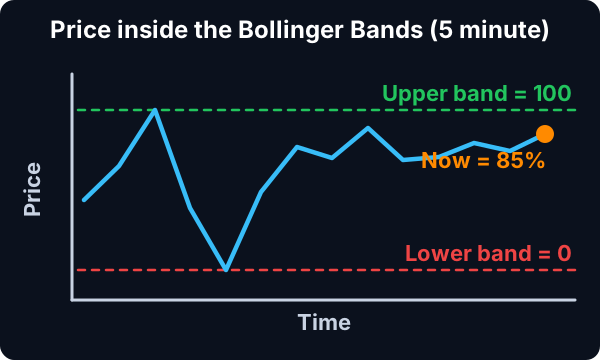
Here's an explanation of how this filter works:
Calculation: The position of the current price relative to the Bollinger Bands is calculated by comparing the current price to the upper and lower bands.
Trader tip
Interpretation: Traders interpret the position of the price within the Bollinger Bands to assess potential buying or selling opportunities. If the price is near the upper band, it may signal an overbought condition and a potential opportunity to sell or short the stock. If the price is near the lower band, it may indicate an oversold condition and a potential opportunity to buy or go long on the stock.
This filter compares the price of the last print to the 20 period Bollinger Bands. This corresponds to the "%b" formula found at http://www.bollingerbands.com/. 0 means that the last print touches the lower Bollinger Band, 100 means the last print touches the upper Bollinger Band. Values can be higher, lower, or in between 0 and 100.
Settings
This filter is similar to the three pairs of position in range filters above. The difference is that this filter uses statistical analysis to determine the top and bottom of the ranges. The previous filters use an absolute high and low, possibly only two prints, to set the range.
Position in Bollinger Bands (5 min) filter settings
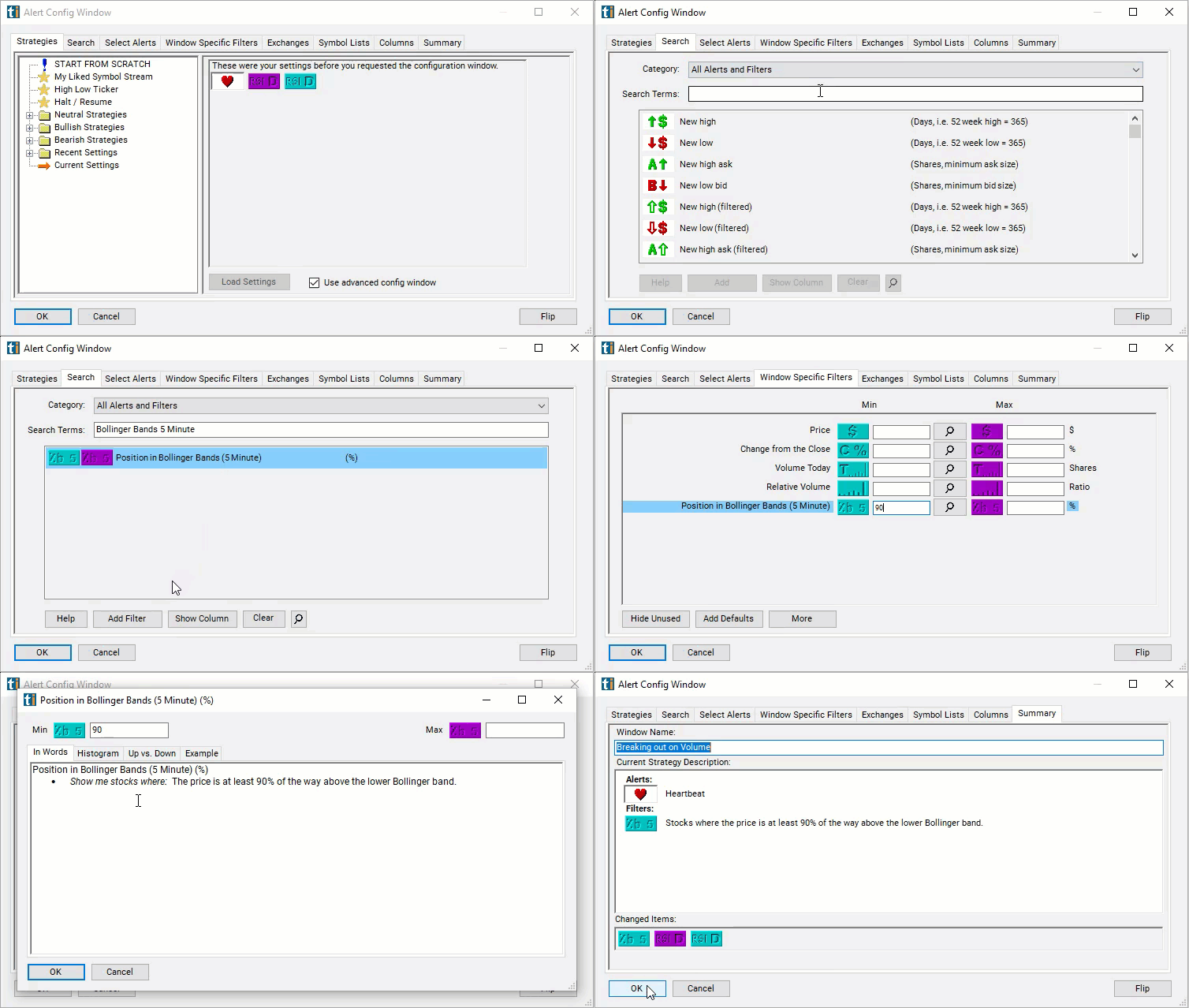
The settings of each Trade Ideas filter are defined in the Window Specific Filters Tab located in the Configuration Window of your Alert or Top List (Screener) window.
Here is how to setup the filter in your configuration window:
- Set the min value to 90 to see stocks which are overbought on the 5 minute time frame.
Using the Position in Bollinger Bands (5 min) Filter
Several trading strategies can be employed with the Position in Bollinger Bands (5 min) filter. Here are a few examples:
- Mean Reversion: Trade reversions to the mean when the price moves beyond the Bollinger Bands. Enter short positions when the price touches or crosses above the upper Bollinger Band, anticipating a pullback towards the middle band. Enter long positions when the price touches or crosses below the lower Bollinger Band, anticipating a bounce back towards the middle band.
- Trend Following: Trade in the direction of the trend when the price remains within the Bollinger Bands. In an uptrend, buy when the price bounces off the lower Bollinger Band and continues upward. In a downtrend, sell short when the price bounces off the upper Bollinger Band and continues downward.
- Breakout Trading: Trade breakouts when the price moves outside the Bollinger Bands. Buy when the price breaks above the upper Bollinger Band, anticipating a continuation of the uptrend. Sell short when the price breaks below the lower Bollinger Band, anticipating a continuation of the downtrend.
Filters to combine with Position in Bollinger Bands (5 min)
Alerts to pair with the Position in Bollinger Bands (5 min) filter
Categories
FAQ
Which stocks are trading below the lower Bollinger Band right now?
Add the Position in Bollinger Bands (5 min) filter (Boll5) to a Trade Ideas Streaming Alerts or Top List (Screener) window. Set the min value to 90 to see stocks which are overbought on the 5 minute time frame.
What is the Position in Bollinger Bands (5 min) filter?
The Position in Bollinger Bands (5 min) filter places the last print between the bands on the 5-minute chart: 0 means touching the lower band, 100 means touching the upper band. Values can go below 0 or above 100.
How do I scan for stocks at the upper Bollinger Band?
Use the Position in Bollinger Bands (5 min) filter (Boll5) in Trade Ideas Streaming Alerts and Top Lists to find stocks trading at, or outside, their 5-minute Bollinger Bands. The Position in Bollinger Bands (5 min) filter places the last print between the bands on the 5-minute chart: 0 means touching the lower band, 100 means touching the upper band.