







 Range60
Filter
60 Minute Range Filter (Range60)
Find stocks with the widest 60-minute trading range right now, in dollars, in real time, with Trade Ideas Streaming Alerts (Scanner) and Top Lists (Screeners). The Range (60 min, $) filter measures the difference between the highest and lowest prices a stock traded in the last 60 minutes, in dollars.
Stocks making a run, up and down.
Free account, just an email. No card. Live access for a limited time.

Streaming Alerts check the Range (60 min, $) filter the moment each alert fires, and Top Lists can sort by it.
How Trade Ideas finds it: to find stocks with a 60-minute range of at least $1.60, add the Range (60 min, $) filter and enter 1.6 in the minimum field. To find stocks with a 60-minute range of no more than $8, add the Range (60 min, $) filter and enter 8 in the maximum field. See Trade Ideas plans and pricing to run it live.
How the Range (60 min, $) filter works
The Range (60 min, $) filter is a tool for active traders who need real-time, precise insights into the shorter-term volatility of a stock's price.
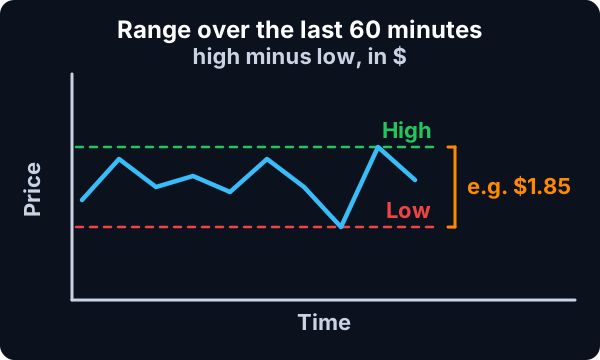
This filter calculates the difference between the highest and lowest prices a stock has traded within the last 60-Minute time period.
Example
As an example, if a stock hits a peak of $10.50 and a low of $9.30 within a specific 60-Minute interval, the Range (60 min, $) Filter would return $1.20.
This filter is sensitive to all price movements, so a single price swing, regardless of how significant, can greatly impact the range.
Key point
Precise to the minute, the Range (60 min, $) Filter constantly updates as time ticks forward. This means at exactly 10:30, the filter will analyze the trades from 9:30 to 10:30. 59 seconds later, at 10:30:59, the server still looks at 9:30 and ends at the current time. 1 second after that, at 10:31, the server looks at all prints between 9:31 and the current time. It always maintains a precise 60-Minute window.
This filter works before, after, and during normal market hours. As long as there's at least one trade within the 60-Minute timeframe, the filter remains operative.
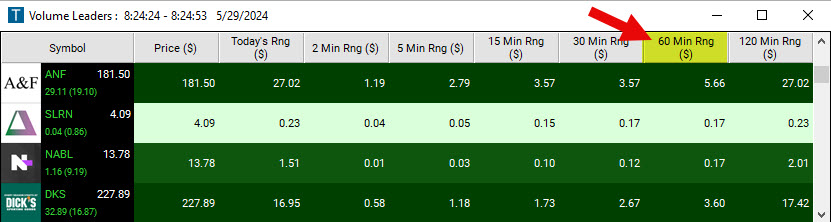
Range (60 min, $) filter settings
Activating the Range (60 min, $) Filter is straightforward. You'll find its settings under the Window Specific Filters Tab in your Alert and Top List (Screener) Configuration Window.
Settings
You can set a minimum and/or maximum value, and stocks that don't fit within your parameters are automatically excluded from your scan results.
- To find stocks with a 60-minute range of at least $1.60, add the Range (60 min, $) Filter to your scan and enter 1.6 in the minimum field in the Window Specific Filters Tab.
- To find stocks with a 60-minute range of no more than $8, add the Range (60 min, $) Filter to your scan and enter 8 in the maximum field in the Window Specific Filters Tab.
- To find stocks with a 60-minute range between $1.45 and $5.95, add the Range (60 min, $) Filter to your scan and enter 1.45 in the minimum field and 5.95 in the maximum field in the Window Specific Filters Tab.
Using the 60 minute Dollar Range in Trading
The 60-minute range in dollar filter is a versatile tool that can provide valuable insights for a wide range of trading strategies. The ability to set minimum and maximum values for the filter allows traders to customize the tool according to their unique risk tolerance and strategic goals.
Filters to combine with Range (60 min, $)
Alerts to pair with the Range (60 min, $) filter
Categories
FAQ
Which stocks are moving the most in the last 60 minutes?
Add the Range (60 min, $) filter (Range60) to a Trade Ideas Streaming Alerts or Top List (Screener) window. To find stocks with a 60-minute range of at least $1.60, add the Range (60 min, $) filter and enter 1.6 in the minimum field. To find stocks with a 60-minute range of no more than $8, add the Range (60 min, $) filter and enter 8 in the maximum field.
What is the Range (60 min, $) filter?
The Range (60 min, $) filter measures the difference between the highest and lowest prices a stock traded in the last 60 minutes, in dollars.
How do I find fast-moving stocks intraday?
Use the Range (60 min, $) filter (Range60) in Trade Ideas Streaming Alerts and Top Lists to find stocks with the widest 60-minute trading range right now, in dollars. The Range (60 min, $) filter measures the difference between the highest and lowest prices a stock traded in the last 60 minutes, in dollars.
Can this filter be used for stocks across all price ranges?
Technically, yes. However, the significance of the 60-minute range may vary with the price of the stock. For example, a $0.10 range might be highly significant for a $2 stock but less so for a $200 stock. Therefore, you might want to adjust the filter parameters or the way you interpret the results based on the general price range of the stocks you're interested in. Alternatively, use our 60-minute range in % Filter to gain insights.
Is there a way to compare the 60-minute range to the Daily Range of a stock?
You can create a simple ratio formula to see how the Range (60 min, $) contributes to the total day's range with the help of our Formula Editor.
The formula you could use is: [Range60]/[TRangeD]
This formula will give you the fraction of the total day's range that is accounted for by the Range (60 min, $). This comparison can give you a sense of how much short-term volatility is happening compared to the total day's volatility.
If you wanted to return a percentage instead of a ratio, you would use the following formula instead:
([Range60]/[TRangeD])*100
For example, let's say that the price of the stock varied by $5.50 throughout the day and the price of the stock varied by $1.20 in a specific 60-Minute interval. The calculation would then be:
$1.20/$5.50 = 0.2 or 22%
This means that the Range (60 min, $) represents 22% of the total day's range, indicating significant short-term volatility during that specific 60-Minute interval.
A higher ratio (i.e., closer to 1 or 100%) suggests that a significant part of the day's price movement is happening within 60-Minute intervals, which might indicate a higher level of short-term volatility. Conversely, a lower ratio (i.e., closer to 0) suggests that the 60-Minute price movements contribute less to the overall day's range, potentially indicating lower short-term volatility.
This ratio could be used to inform your trading decisions based on your trading strategy and tolerance for volatility. For example, if you are a short-term trader who is looking for stocks with high volatility, you might look for stocks with a high 60-minute range to Daily Range ratio.
This is just one simple way to compare these two measures, and you may want to consider using additional technical indicators or analysis methods for a more comprehensive view of the market.
Is there a difference between the various Range in Dollar Filters or do they all work exactly the same way?
Yes, there is a difference. The Range (2 min, $) Filter is precise to the second, whereas the 5 to Range (120 min, $) Filters are precise to the minute.
Can I use the Range (60 min, $) filter for pre-market and after-market trading?
Yes, the filter operates during pre-market and after-market hours, as well as during normal market hours. However, you should note that volume is typically lower outside normal market hours, which can impact volatility and price movements.