







 U10DD
U10DD
Filter
Change in 10 Days Filter (U10DD)
Find the top gainers and losers over the last 10 days, in dollars, in real time, with Trade Ideas Streaming Alerts (Scanner) and Top Lists (Screeners). The Change (10 day, $) filter compares the current price to the price 10 days ago, in dollars. These are trading days, not calendar days.
Stocks making a run, up and down.
Free account, just an email. No card. Live access for a limited time.
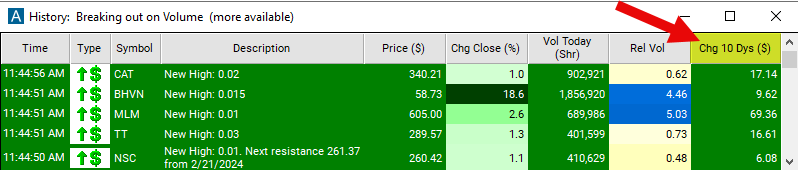
Streaming Alerts check the Change (10 day, $) filter the moment each alert fires, and Top Lists can sort by it.
How Trade Ideas finds it: set the min value to 5 to see stocks which are up at least $5 from 10 days ago. See Trade Ideas plans and pricing to run it live.
How the Change (10 day, $) filter works
The "change in 10 days ($)" filter compares the current price to the price 10 days ago, measured in dollars. These are trading days, not calendar days. So this filter looks at changes in the last 2 weeks.
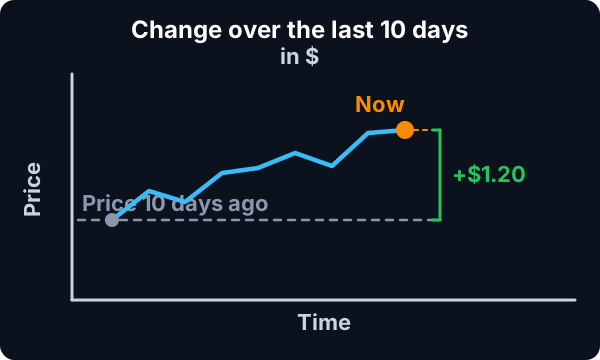
The formula for the $ version is simply the current price minus the old price. Bigger numbers mean that the price has moved up more. Negative numbers mean that the price has moved down. 0 means no change.
The current price is based on the last print. There is no smoothing or averaging. This updates before, during, and after market hours.
Key point
The old price is always based on the close. If you are look at the Change (10 day, $) filter, then you are comparing the current price to the close 11 days ago. If you are looking at this filter at the open, then you will see the price change for exactly 10 days. If you are looking at this filter one hour after the open, then you will see the change for 10 days and one hour. At lunch time you will see the change for 10½ days. At the close you will see the change for 11 days.
Change (10 day, $) filter settings
The settings of each Trade Ideas filter are defined in the Window Specific Filters Tab located in the Configuration Window of your Alert or Top List (Screener) window.
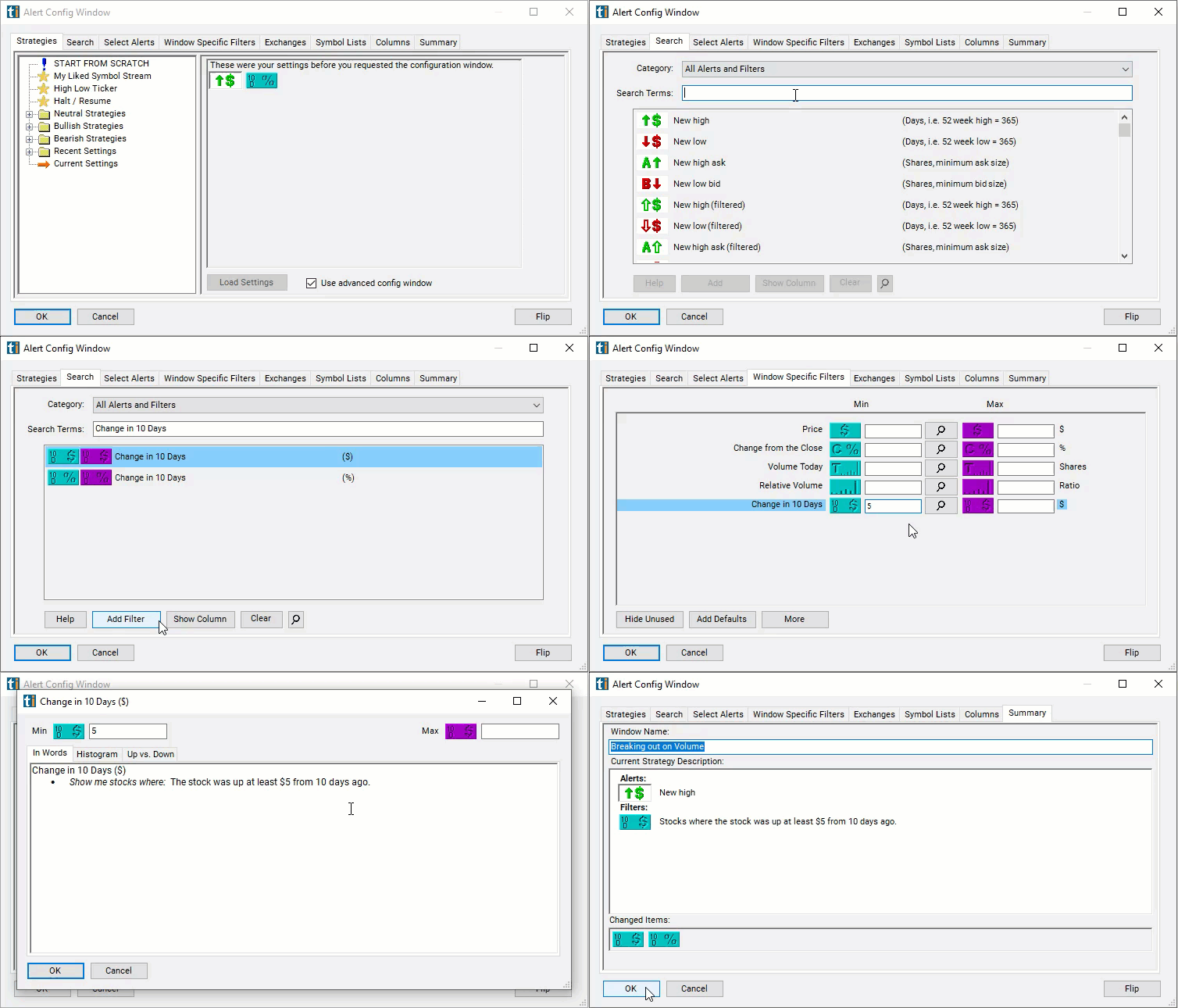
Here is how to setup the filter in your configuration window:
- Set the min value to 5 to see stocks which are up at least $5 from 10 days ago.
Using the Change (10 day, $) Filter
Several trading strategies can be employed with the Change (10 day, $) filter. Here are a few examples:
- Trend Following: Traders aim to capitalize on the continuation of existing price trends. If the change in the stock's price over the past ten days indicates a consistent upward or downward trend, traders may consider entering positions in the direction of the trend. For example, if the stock has experienced a significant positive change over the ten-day period, it may signal an uptrend, prompting traders to enter long positions. Conversely, if there's a significant negative change, it may indicate a downtrend, leading traders to consider short positions.
- Reversal Trading: Traders aim to identify potential reversal points in the price movement. If the change in the stock's price over the past ten days suggests that the price has moved significantly in one direction and may be nearing exhaustion, traders may look for signs of a reversal. For example, if the stock has experienced a strong uptrend over the past ten days and the change is showing signs of slowing down or reversing, traders may anticipate a potential reversal and adjust their positions accordingly.
- Volatility Trading: Traders aim to profit from short-term price fluctuations and increased volatility. If the change in the stock's price over the past ten days indicates increased volatility, traders may look for opportunities to enter short-term trades to capitalize on price movements. They may employ strategies such as scalping or day trading to take advantage of short-term price fluctuations.
Filters to combine with Change (10 day, $)
Alerts to pair with the Change (10 day, $) filter
Categories
FAQ
Which stocks are up the most over the last 10 days?
Add the Change (10 day, $) filter (U10DD) to a Trade Ideas Streaming Alerts or Top List (Screener) window. Set the min value to 5 to see stocks which are up at least $5 from 10 days ago.
What is the Change (10 day, $) filter?
The Change (10 day, $) filter compares the current price to the price 10 days ago, in dollars. These are trading days, not calendar days.
How do I find the best performing stocks over a period?
Use the Change (10 day, $) filter (U10DD) in Trade Ideas Streaming Alerts and Top Lists to find the top gainers and losers over the last 10 days, in dollars. The Change (10 day, $) filter compares the current price to the price 10 days ago, in dollars.