







 Time
Time
Filter
Time Of Day Filter (Time)
Find stocks only at the time of day you trade, such as after the first 30 minutes, in real time, with Trade Ideas Streaming Alerts (Scanner) and Top Lists (Screeners). The Time of Day filter is the number of minutes after the open when an alert fires: 0 means exactly at the open, 1 means one minute after, and 60 means one hour after.
See the move. Then decide.
Free account, just an email. No card. Live access for a limited time.
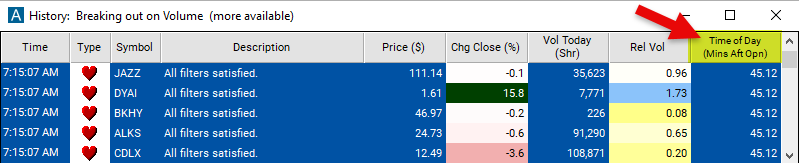
Streaming Alerts check the Time of Day filter the moment each alert fires, and Top Lists can sort by it.
How Trade Ideas finds it: set the minimum value to 30 to see only stocks where a specific alert occurred at least 30 minutes after the open. See Trade Ideas plans and pricing to run it live.
How the Time Of Day filter works
The time of day filter allows traders to specify a particular time after the market open to filter data. This is the number of minutes after the open.
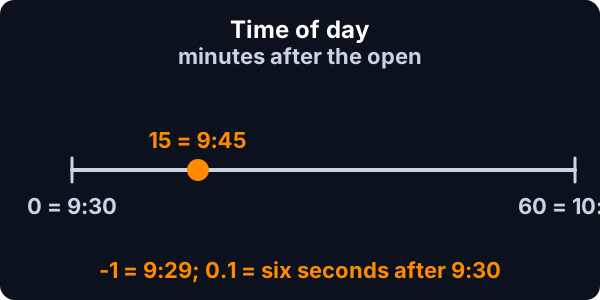
- 0 means exactly the open.
- 1 means one minute after the open.
- 60 means one hour after the open.
- 0.1 means six seconds after the open.
- -1 means one minute before the open.
Time Of Day filter settings
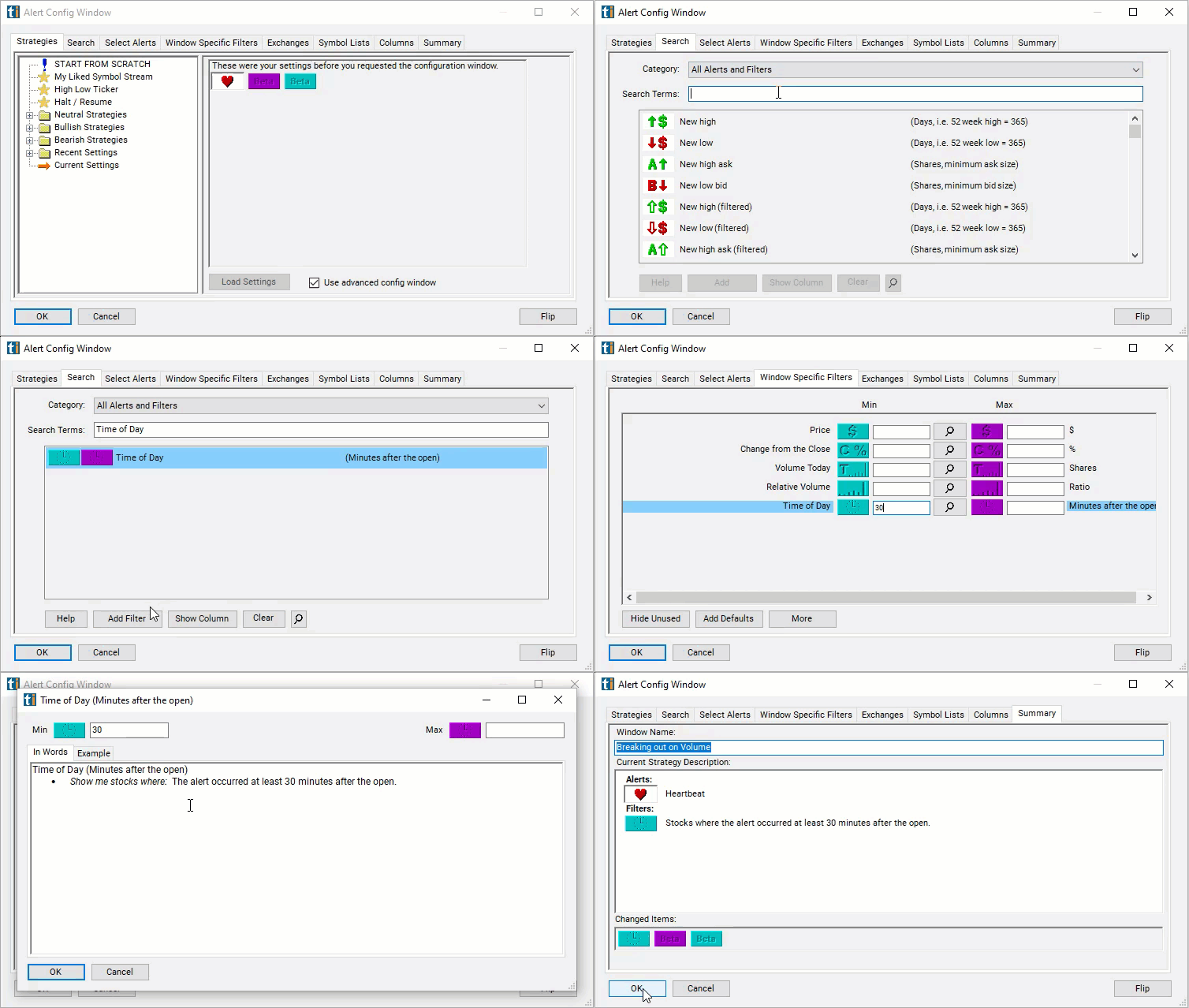
Configuring the "Time of Day" filter is simple and can be done within the Window Specific Filters Tab of the Configuration Window in your Alert or Top List (Screener) window.
Here's how to set up the filter in your configuration window:
- Set the minimum value to 30 to see only stocks where a specific alert occurred at least 30 minutes after the open.
Using the Time of Day Filter
The "Time of Day" filter can be used in various ways, including:
- Traders may use the time of day filter to analyze price movements, volume, or other trading metrics at specific time intervals after the market open.
- For example, traders may be interested in studying price volatility in the first 15 minutes after the market open or analyzing volume spikes one hour into the trading session.
- By setting the filter to different time intervals, traders can identify patterns, trends, or trading opportunities that occur during specific periods of the trading day.
Filters to combine with Time Of Day
Alerts to pair with the Time Of Day filter
FAQ
How do I avoid alerts in the first 30 minutes of the market?
Add the Time Of Day filter (Time) to a Trade Ideas Streaming Alerts or Top List (Screener) window. Set the minimum value to 30 to see only stocks where a specific alert occurred at least 30 minutes after the open.
What is the Time of Day filter?
The Time of Day filter is the number of minutes after the open when an alert fires: 0 means exactly at the open, 1 means one minute after, and 60 means one hour after.
What is the best time of day to trade stocks?
Use the Time Of Day filter (Time) in Trade Ideas Streaming Alerts and Top Lists to get alerts only at the time of day you trade, such as after the first 30 minutes. The Time of Day filter is the number of minutes after the open when an alert fires: 0 means exactly at the open, 1 means one minute after, and 60 means one hour after.