







 SmartStopD
Filter
Smart Stop Filter (SmartStopD)
Find a custom stop-loss distance for each stock at the moment the alert fires, in dollars, in real time, with Trade Ideas Streaming Alerts (Scanner) and Top Lists (Screeners). Smart Stop is a proprietary Trade Ideas risk filter that suggests a stop-loss exit point for a trade taken when the alert fires. It is unique to each symbol, based on the stock's volatility, relative volume and daily range.
Stocks making a run, up and down.
Free account, just an email. No card. Live access for a limited time.
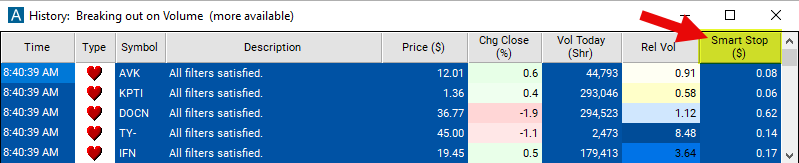
Streaming Alerts check the Smart Stop ($) filter the moment each alert fires, and Top Lists can sort by it.
How Trade Ideas finds it: adjust the minimum value to .10 to see only stocks with a stop loss of $0.10 or more. Adjust the maximum value to 1 to see only stocks with a stop loss of $1 or less. See Trade Ideas plans and pricing to run it live.
How the Smart Stop filter works
The Smart Stop is a proprietary risk management filter created by Trade Ideas. It helps traders identify a custom stop loss exit point for trades made at the time the alert was triggered. A stop loss is an order placed with a broker to sell a stock when it reaches a certain price, designed to limit a trader's loss on a position.
Trader tip
This exit point is unique to each symbol based on the stock’s volatility, relative volume and daily range. This exit point is unique to each symbol based on the stock’s volatility, relative volume and daily range. By using the smart stop filter, traders can adapt their risk management strategy to changing market conditions and reduce the risk of significant losses during volatile trading periods.
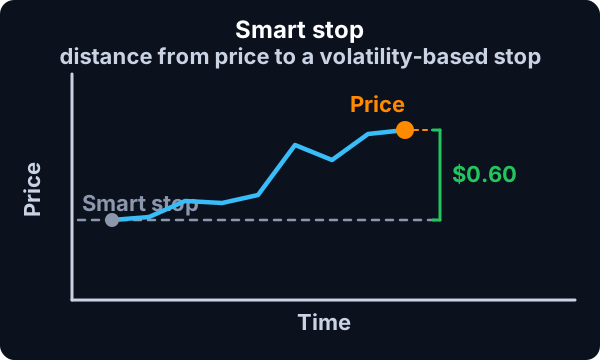
This stop loss filter is expressed in terms of dollars.
Smart Stop filter settings
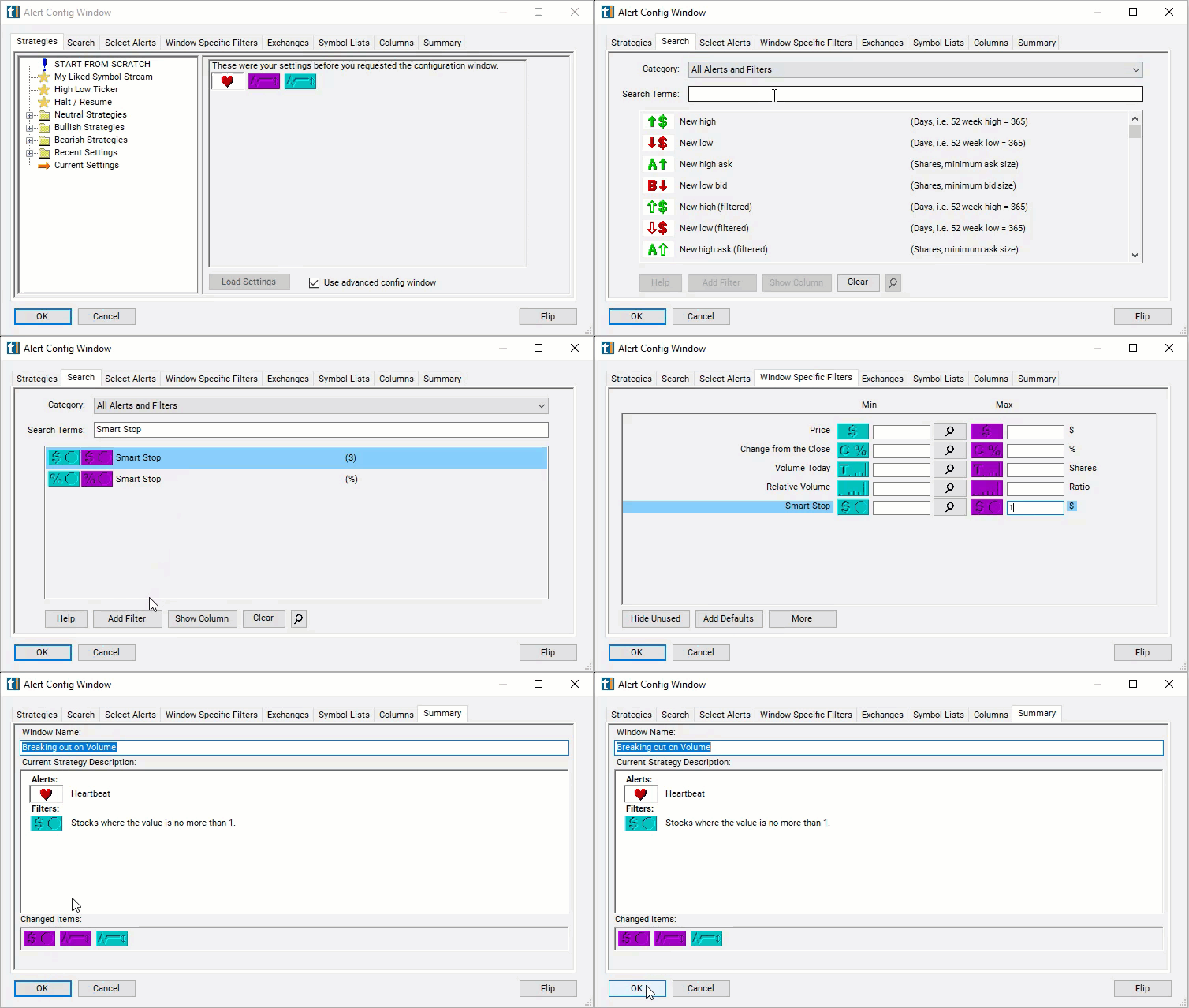
Configuring the "Smart Stop ($)" filter is simple and can be done within the Window Specific Filters Tab of the Configuration Window in your Alert or Top List (Screener) window.
Here's how to set up the filter in your configuration window:
- Adjust the minimum value to .10 to see only stocks with a stop loss of $0.10 or more.
- Adjust the maximum value to 1 to see only stocks with a stop loss of $1 or less.
Using the Smart Stop Dollar Filter
The "Smart Stop ($)" filter can be used in various trading strategies, including:
- Fixed Dollar Stop Loss: Traders set a predetermined dollar amount as their maximum acceptable loss for each trade. This fixed dollar amount serves as their stop loss level, and they exit the trade if the price moves against them by that amount. For example, a trader may decide to set a stop loss of $100 per trade, meaning they will exit the position if it moves $100 against them.
- Volatility-based Stop Loss: Traders adjust their stop loss levels based on market volatility. They use the stop loss filter to dynamically calculate stop loss distances relative to recent price movements. In high volatility environments, they widen their stop loss orders to accommodate larger price swings, while in low volatility conditions, they tighten their stop loss orders to reduce risk.
- Price Action Stop Loss: Traders use price action signals such as candlestick patterns, chart patterns, and trendline breaks to determine optimal stop loss levels. They place their stop loss orders beyond recent swing highs or lows identified by price action analysis. The stop loss filter assists them in calculating the precise distance for stop loss placement based on recent price movements.
Filters to combine with Smart Stop
FAQ
Where should I set my stop loss on this trade?
Add the Smart Stop filter (SmartStopD) to a Trade Ideas Streaming Alerts or Top List (Screener) window. Adjust the minimum value to .10 to see only stocks with a stop loss of $0.10 or more. Adjust the maximum value to 1 to see only stocks with a stop loss of $1 or less.
What is the Smart Stop ($) filter?
Smart Stop is a proprietary Trade Ideas risk filter that suggests a stop-loss exit point for a trade taken when the alert fires. It is unique to each symbol, based on the stock's volatility, relative volume and daily range.
How do I size a stop loss to a stock's volatility?
Use the Smart Stop filter (SmartStopD) in Trade Ideas Streaming Alerts and Top Lists to get a custom stop-loss distance for each stock at the moment the alert fires, in dollars. Smart Stop is a proprietary Trade Ideas risk filter that suggests a stop-loss exit point for a trade taken when the alert fires.