







 PivotR1
Filter
Distance From Pivot R1 Filter (PivotR1)
Find stocks trading above, below, or near their first resistance pivot (R1), in real time, with Trade Ideas Streaming Alerts (Scanner) and Top Lists (Screeners). The Distance from Pivot R1 filter measures how far the current price is from the first resistance pivot (R1), in percent. Pivot levels are calculated from the previous day's high, low and close.
Know when price crosses your line.
Free account, just an email. No card. Live access for a limited time.
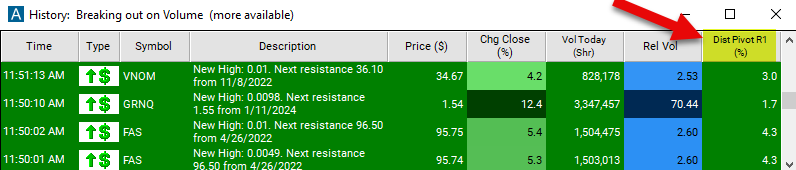
Streaming Alerts check the Distance From Pivot R1 filter the moment each alert fires, and Top Lists can sort by it.
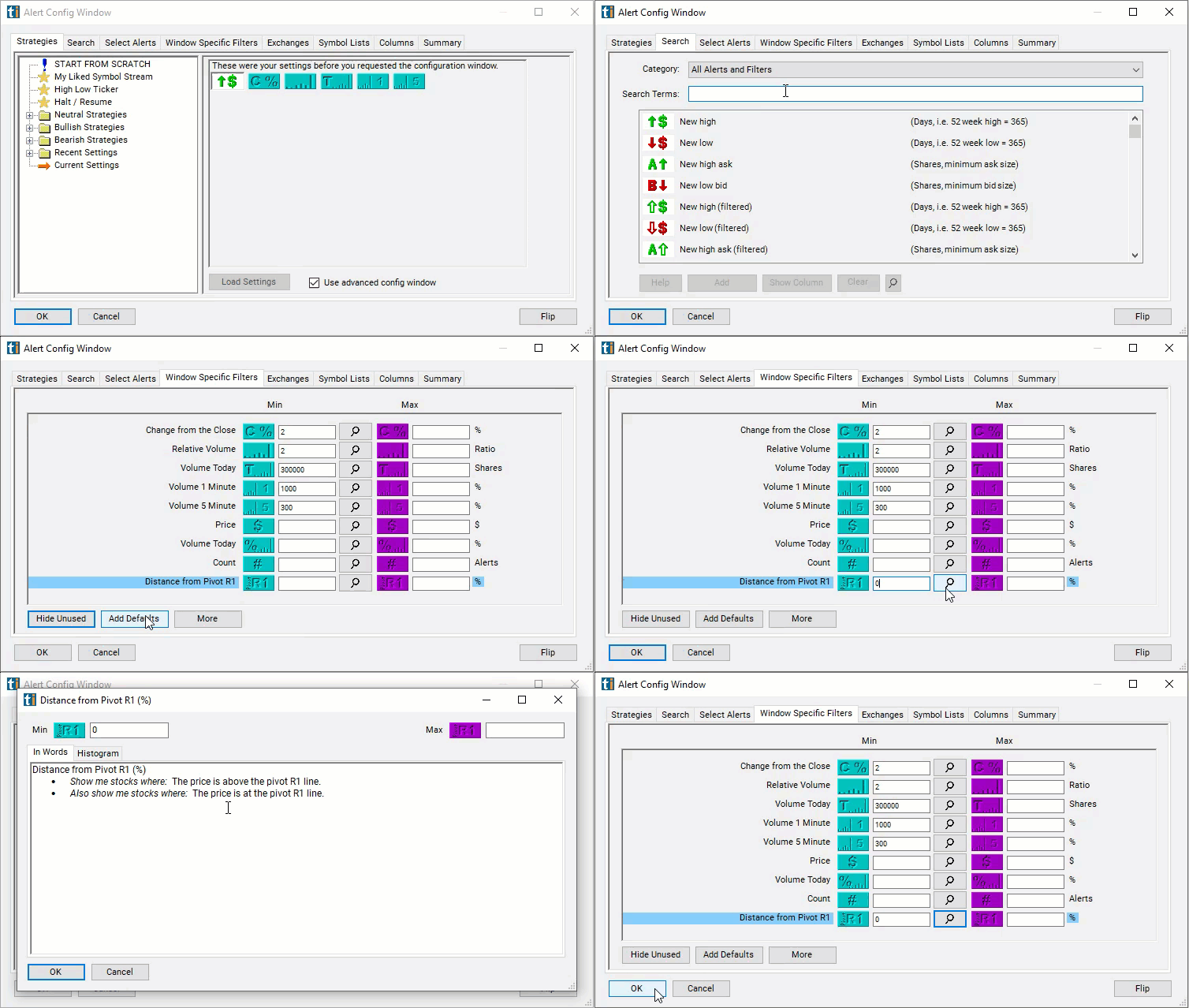
How Trade Ideas finds it: to find stocks above their first resistance line, set the min above pivot R1 to 0. See Trade Ideas plans and pricing to run it live.
How the Distance From Pivot R1 filter works
This distance from pivot filter specifically refers to a strategy where traders look at how far a stock's current price is from a pivot point level, particularly the R1 level. R1 represents the first resistance level calculated from the pivot points formula.
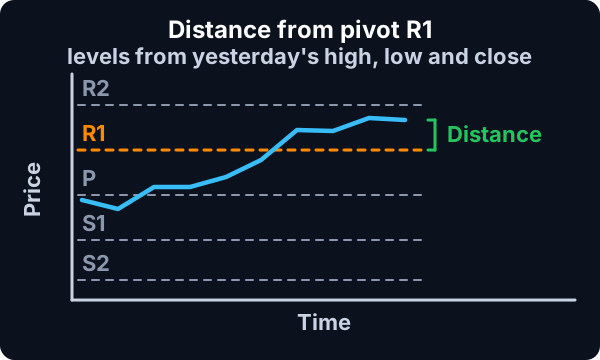
Here's how it works:
Calculate Pivot Points: The first step is to calculate pivot points. This involves determining a pivot point (P) as well as support (S1, S2, etc.) and resistance (R1, R2, etc.) levels based on the previous day's price action. Here are the formulas to caculate those specific points:
- Resistance 2 = Pivot + (R1 - S1)
- Resistance 1 = 2 * Pivot - Low
- Pivot Point = (High + Close + Low) / 3
- Support 1 = 2 * Pivot - High
- Support 2 = Pivot - (R1 - S1)
These are all based on the previous day's high, low, and close:
Formula
Identify R1: R1 is the first resistance level calculated in the pivot points formula. It represents a level above which the price may face selling pressure.
Calculate Distance from R1: Once R1 is identified, traders measure how far the current price of the stock is from this level. This distance is calculated in terms of percentage.
Distance From Pivot R1 filter settings
The settings of each Trade Ideas filter are defined in the Window Specific Filters Tab located in the Configuration Window of your Alert or Top List (Screener) window.
Here is how to setup the filter in your configuration window:
- To find stocks above their first resistance line, set the min above pivot R1 to 0. These are stocks which are doing well compared to yesterday.
Using the Distance from Pivot R1 Filter
Several trading strategies can be employed with the Distance from Pivot R1 filter. Here are a few examples:
- Breakout Trading: Buying when the price breaks above R1, anticipating further upward movement.
- Reversal Trading: Selling short or exiting long positions when the price approaches R1, expecting a reversal.
- Trend Confirmation: Confirming the strength of an uptrend if the price remains above R1 or the weakness of a downtrend if it struggles to break through R1.
Filters to combine with Distance From Pivot R1
Alerts to pair with the Distance From Pivot R1 filter
Categories
FAQ
Which stocks are trading above their first resistance pivot (R1) right now?
Add the Distance From Pivot R1 filter (PivotR1) to a Trade Ideas Streaming Alerts or Top List (Screener) window. To find stocks above their first resistance line, set the min above pivot R1 to 0.
What is the Distance From Pivot R1 filter?
The Distance from Pivot R1 filter measures how far the current price is from the first resistance pivot (R1), in percent. Pivot levels are calculated from the previous day's high, low and close.
How do I scan for stocks near pivot points?
Use the Distance From Pivot R1 filter (PivotR1) in Trade Ideas Streaming Alerts and Top Lists to find stocks trading above, below, or near their first resistance pivot (R1). The Distance from Pivot R1 filter measures how far the current price is from the first resistance pivot (R1), in percent.