







 PUp120
Filter
Change 120 Minute Filter (PUp120)
Find stocks moving up or down fast in the last 120 minutes, in percent, in real time, with Trade Ideas Streaming Alerts (Scanner) and Top Lists (Screeners). The Change (120 min, %) filter measures how much a stock's price has changed over the last 120 minutes, in percent.
Stocks making a run, up and down.
Free account, just an email. No card. Live access for a limited time.
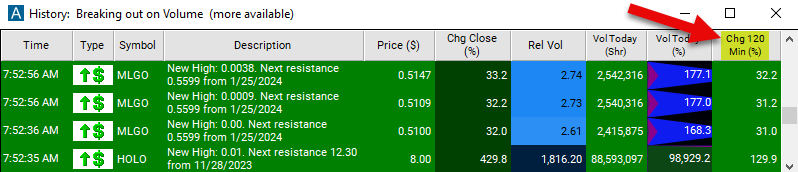
Streaming Alerts check the Change (120 min, %) filter the moment each alert fires, and Top Lists can sort by it.
How Trade Ideas finds it: you can set the minimum move to 10% to see only stocks which have gone up at least 10% in the last 120 minutes, and set the maximum to 10% and the minimum to -10% to see only stocks which have moved less than 10% in either direction in the last 120 minutes. See Trade Ideas plans and pricing to run it live.
How the Change (120 min, %) filter works
The "Change (120 min, %)" filter in stock trading is a technical analysis tool used to identify stocks or assets that have experienced a significant change in price over a 120-minute time frame. This filter focuses on measuring the price movement of a stock within a relatively longer duration, specifically two hour, and identifies stocks that have experienced a notable increase or decrease in price during that period.
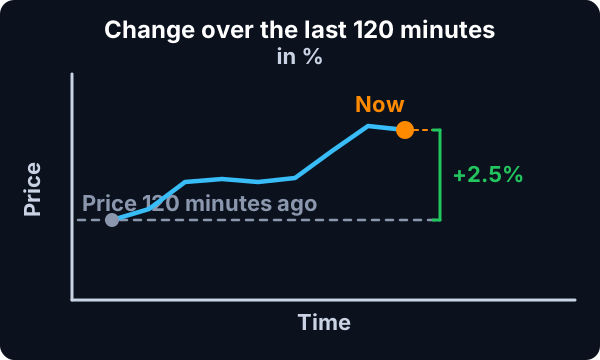
Here's how the "Change (120 min, %)" filter typically works:
- Definition of Change: Traders specify the criteria for what constitutes a significant change in price over 120 minutes. For example, they may set the filter to identify stocks that have increased or decreased in price by a certain percentage or amount within the 120-minute time frame.
- Real-Time Monitoring: The filter continuously monitors the stock market in real-time, analyzing price data for individual stocks over 120-minute intervals.
- Identification of Significant Changes: When the filter detects stocks that meet the predefined criteria for a significant change in price over 120 minutes, it generates an alert or notification, signaling potential trading opportunities.
Change (120 min, %) filter settings
Example
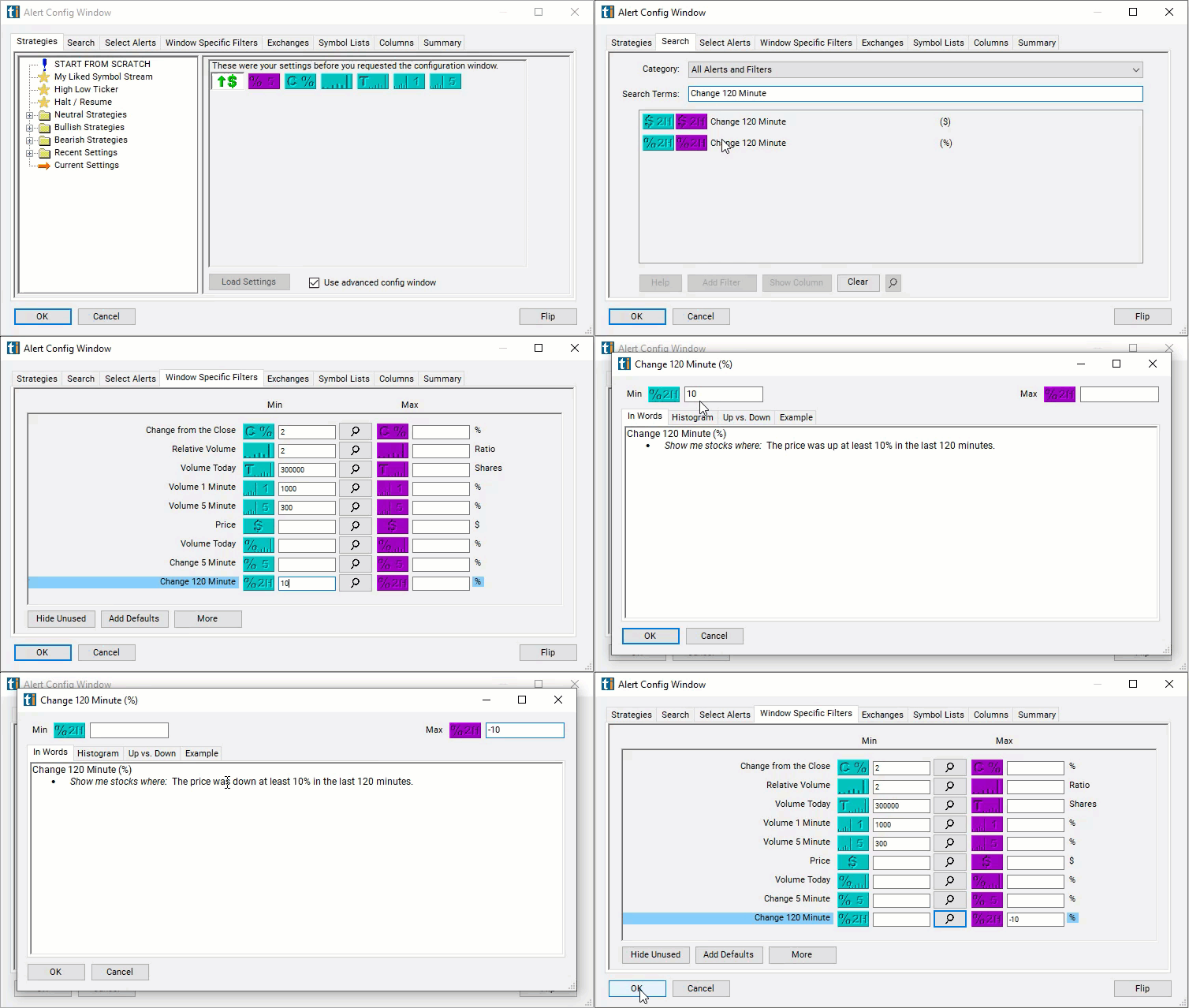
The settings of each Trade Ideas filter are defined in the Window Specific Filters Tab located in the Configuration Window of your Alert or Top List (Screener) window. These filters select stocks based on how much they have moved in the last 120 minutes. For example, you can set the minimum move to 10% to see only stocks which have gone up at least 10% in the last 120 minutes.
Example
Combine these to create a range. For example, set the maximum to 10% and the minimum to -10% to see only stocks which have moved less than 10% in either direction in the last 120 minutes.
These filters work before, during, and after regular trading hours.
Using the Change (120 min, %) Filter
The "Change (120 min, %)" filter in stock trading can be integrated into various trading strategies to capture longer-term price movements and identify trading opportunities. Here are some strategies commonly used with the "Change (120 min, %)" filter:
- Trend Following: Traders can use the "Change (120 min, %)" filter to confirm trends identified on longer time frames, such as daily or weekly charts. When the filter detects a significant change in price over the past 120 minutes in line with the prevailing trend, it may signal an opportunity to enter trades in the direction of the trend. Traders can look for stocks that exhibit sustained upward or downward momentum over the 120-minute interval to capitalize on trend-following strategies.
- Breakout Trading: Breakout traders utilize the "Change (120 min, %)" filter to identify potential breakout opportunities on longer time frames. When the filter identifies stocks that have experienced a significant price change over the past 120 minutes, it may signal the beginning of a new trend or breakout from a consolidation phase. Traders can enter trades in the direction of the breakout, aiming to capture profits as the price continues to trend in the breakout direction.
- Swing Trading: Swing traders can use the "Change (120 min, %)" filter to identify swing trading opportunities based on longer-term price movements. When the filter detects a significant change in price over the past 120 minutes, it may signal the initiation or continuation of a swing trading setup. Traders can enter trades with the objective of capturing profits from price swings that unfold over several hours or days, aligning their trades with the direction of the identified price change.
- Pullback Trading: Pullback traders incorporate the "Change (120 min, %)" filter to identify pullback opportunities within an existing trend. When the filter identifies stocks that have experienced a significant change in price over the past 120 minutes against the prevailing trend, it may signal a potential pullback or retracement. Traders can look for entry opportunities to join the trend at more favorable prices following the pullback, aiming to profit as the price resumes its upward or downward trajectory.
- Volatility Trading: Volatility traders utilize the "Change (120 min, %)" filter to identify stocks with high volatility levels on longer time frames. When the filter detects significant price changes over the past 120 minutes, it may signal heightened volatility and potential trading opportunities. Traders can enter trades to capitalize on price movements driven by increased volatility, adjusting their position sizing and risk management strategies to account for the higher volatility environment.
Filters to combine with Change (120 min, %)
Alerts to pair with the Change (120 min, %) filter
Categories
FAQ
Which stocks are moving the fastest right now?
Add the Change (120 min, %) filter (PUp120) to a Trade Ideas Streaming Alerts or Top List (Screener) window. You can set the minimum move to 10% to see only stocks which have gone up at least 10% in the last 120 minutes, and set the maximum to 10% and the minimum to -10% to see only stocks which have moved less than 10% in either direction in the last 120 minutes.
What is the Change (120 min, %) filter?
The Change (120 min, %) filter measures how much a stock's price has changed over the last 120 minutes, in percent.
How do I find stocks up the most in the last 120 minutes?
Use the Change (120 min, %) filter (PUp120) in Trade Ideas Streaming Alerts and Top Lists to find stocks moving up or down fast in the last 120 minutes, in percent. The Change (120 min, %) filter measures how much a stock's price has changed over the last 120 minutes, in percent.