







 PUp1
PUp1
Filter
Change 1 Minute Filter (PUp1)
Find stocks moving up or down fast in the last 1 minute, in percent, in real time, with Trade Ideas Streaming Alerts (Scanner). The Change (1 min, %) filter measures how much a stock's price has changed over the last 1 minute, in percent.
Stocks making a run, up and down.
Free account, just an email. No card. Live access for a limited time.
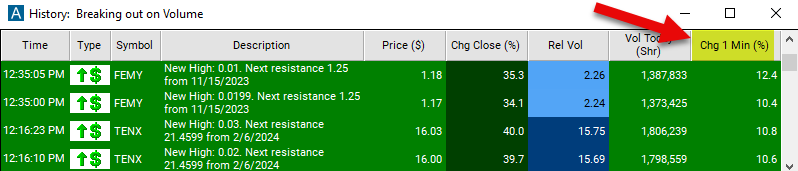
Streaming Alerts check the Change (1 min, %) filter the moment each alert fires.
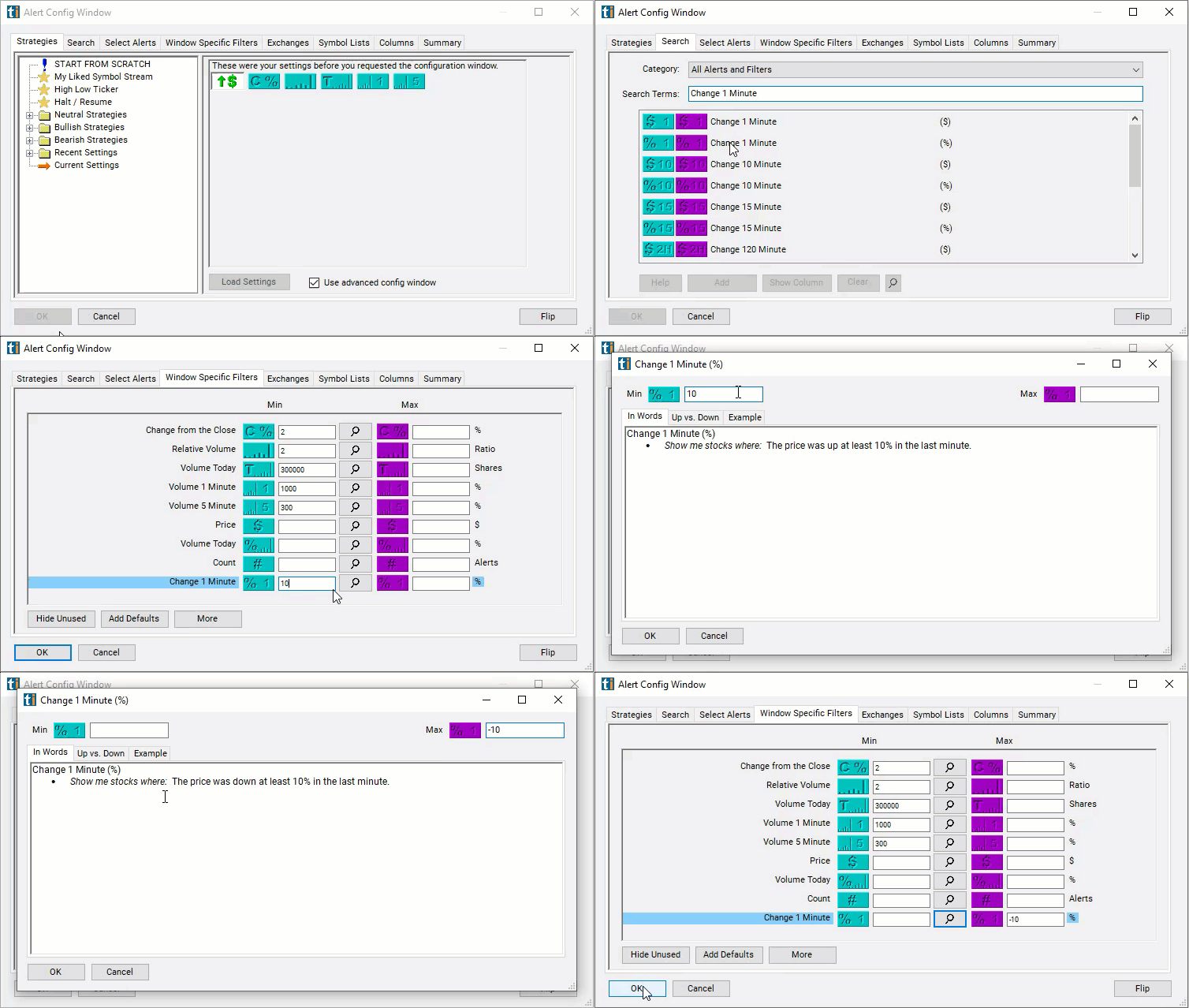
How Trade Ideas finds it: you can set the maximum move to -10% to see only stocks which have gone down by at least 10% over the last minute, and set the maximum to 10% and the minimum to -10% to see only stocks which have moved less than 10% in either direction in the last minute. See Trade Ideas plans and pricing to run it live.
How the Change (1 min, %) filter works
The "Change (1 min, %)" filter in stock trading refers to a technical analysis tool used to identify stocks or assets that have experienced a significant change in price over a one-minute time frame. This filter focuses on measuring the price movement of a stock within a short duration, specifically one minute, and identifies stocks that have experienced a notable increase or decrease in price during that period.
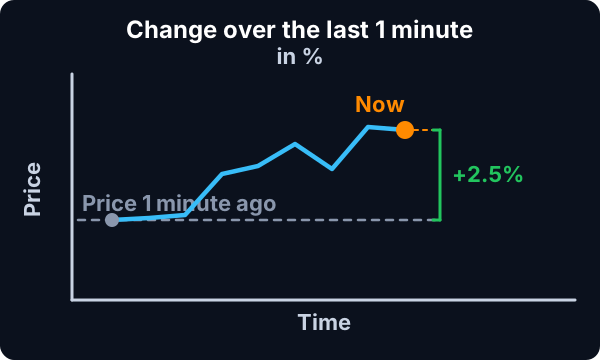
Here's how the "Change (1 min, %)" filter typically works:
- Definition of Change: Traders specify the criteria for what constitutes a significant change in price over one minute. For example, they may set the filter to identify stocks that have increased or decreased in price by a certain percentage or amount within the one-minute time frame.
- Real-Time Monitoring: The filter continuously monitors the stock market in real-time, analyzing price data for individual stocks over one-minute intervals.
- Identification of Significant Changes: When the filter detects stocks that meet the predefined criteria for a significant change in price over one minute, it generates an alert or notification, signaling potential trading opportunities.
Change (1 min, %) filter settings
The settings of each Trade Ideas filter are defined in the Window Specific Filters Tab located in the Configuration Window of your Alert/Top List (Screener) Window. These filters select stocks based on how much they have moved in the last minute. For example, you can set the maximum move to -10% to see only stocks which have gone down by at least 10% over the last minute.
Example
Combine these to create a range. For example, set the maximum to 10% and the minimum to -10% to see only stocks which have moved less than 10% in either direction in the last minute.
These filters work before, during, and after regular trading hours.
Using the Change (1 min, %) Filter
The "Change (1 min, %)" filter in stock trading can be utilized in various trading strategies to capitalize on short-term price movements and intraday opportunities. Here are some strategies commonly used with the "Change (1 min, %)" filter:
- Momentum Trading: Traders can use the "Change (1 min, %)" filter to identify stocks exhibiting strong short-term momentum. When the filter detects a significant increase in price over the past minute, it may signal the presence of buying pressure or upward momentum. Traders may then consider entering long positions to ride the momentum and capture quick profits as the price continues to rise.
- Scalping: Scalpers aim to profit from small price movements over short time frames, often within minutes or seconds. The "Change (1 min, %)" filter can be a valuable tool for scalpers to identify stocks with rapid price fluctuations. Scalpers may use the filter to identify stocks that have experienced significant price changes over the past minute and execute quick trades to capitalize on short-term price movements.
- Breakout Trading: Breakout traders look for stocks that are breaking out of key price levels or trading ranges. The "Change (1 min, %)" filter can help identify stocks that have experienced a sudden increase in price, potentially indicating a breakout. Traders may use the filter to confirm breakout signals from other technical indicators and enter trades in the direction of the breakout to capture profits as the price continues to trend higher.
- Reversal Trading: Traders may use the "Change (1 min, %)" filter to identify potential reversal points in the market. When the filter detects a significant decrease in price over the past minute, it may signal the possibility of a short-term pullback or trend reversal. Traders can use the filter to confirm reversal signals from other indicators and enter contrarian trades to profit from the anticipated price reversal.
- Volatility Trading: Volatility traders aim to profit from fluctuations in market volatility. The "Change (1 min, %)" filter can help identify stocks with high volatility levels, as evidenced by rapid price changes over short time frames. Traders may use the filter to identify volatile stocks and execute trades to capitalize on short-term price swings and volatility spikes.
Filters to combine with Change (1 min, %)
Alerts to pair with the Change (1 min, %) filter
Categories
FAQ
Which stocks are moving the fastest right now?
Add the Change (1 min, %) filter (PUp1) to a Trade Ideas Streaming Alerts window. You can set the maximum move to -10% to see only stocks which have gone down by at least 10% over the last minute, and set the maximum to 10% and the minimum to -10% to see only stocks which have moved less than 10% in either direction in the last minute.
What is the Change (1 min, %) filter?
The Change (1 min, %) filter measures how much a stock's price has changed over the last 1 minute, in percent.
How do I find stocks up the most in the last 1 minute?
Use the Change (1 min, %) filter (PUp1) in Trade Ideas Streaming Alerts to find stocks moving up or down fast in the last 1 minute, in percent. The Change (1 min, %) filter measures how much a stock's price has changed over the last 1 minute, in percent.