







 Dia15
Dia15
Filter
Dow Change 15 Minute Filter (Dia15)
Find stocks that alert only when the Dow Jones Industrial Average is moving up, down, or flat over the last 15 minutes, in real time, with Trade Ideas Streaming Alerts (Scanner) and Top Lists (Screeners). The Dow Change (15 min) filter measures the Dow Jones Industrial Average's percent change over the last 15 minutes. Every stock gets the same value at a given moment, so it acts as a market-direction filter, not a stock filter.
Watch the market turn, stock by stock.
Free account, just an email. No card. Live access for a limited time.
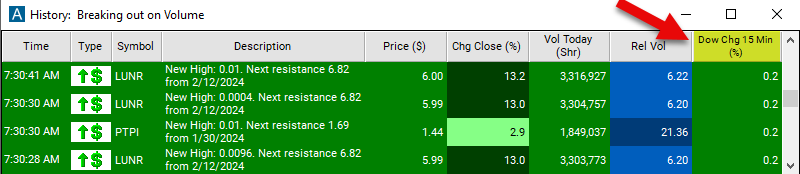
Seeing the Dow Jones Industrial Average turn as it happens helps active traders. The Dow Jones Industrial Average value updates through the session, and Streaming Alerts check it the moment each alert fires, so you only get alerts while the market is moving your way.
How Trade Ideas finds it: set the max to 0.05 and the min to -0.05 to see a market which is very flat. Use a min of 0.15 to see a market which is moving up. See Trade Ideas plans and pricing to run it live.
How the Dow Change (15 min) filter works
This filter describes how quickly the market as a whole is moving, and in which direction.
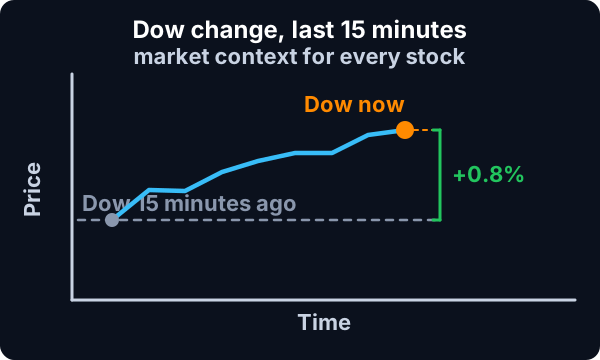
This filter is different from most filters, because they are not specific to any one stock. At any given time all stocks get the same answer for this filter.
The Dow filters track the changes in the Dow Jones Industral Average.
Key point
These filters compare the current price of the index to the price 5, 10, 15, or 30 minutes ago. There is also a daily version which compares the current price to the previous day’s close. The historical price is always precise to the minute. The current price is based on the most recent print.
This filter is primarily meant for use with the OddsMaker TI Premium and other forms of automated trading. This allows you to set up multiple types of strategies in advance. You can run some strategies when the market is going up, and others when the market is going down.
This filter is available before, after, and during regular market hours.
Here's how the "Dow Change (15 min)" filter works:
Key point
Real-Time Monitoring: The filter continuously monitors the price movements of stocks listed on the Dow Jones in real-time, analyzing data over fifteen-minute intervals.
Identification of Significant Changes: When the filter detects stocks that have experienced a significant change in price over the past fifteen minutes, it generates an alert to traders. This alert indicates potential trading opportunities resulting from short-term price movements.
Dow Change (15 min) filter settings
Example
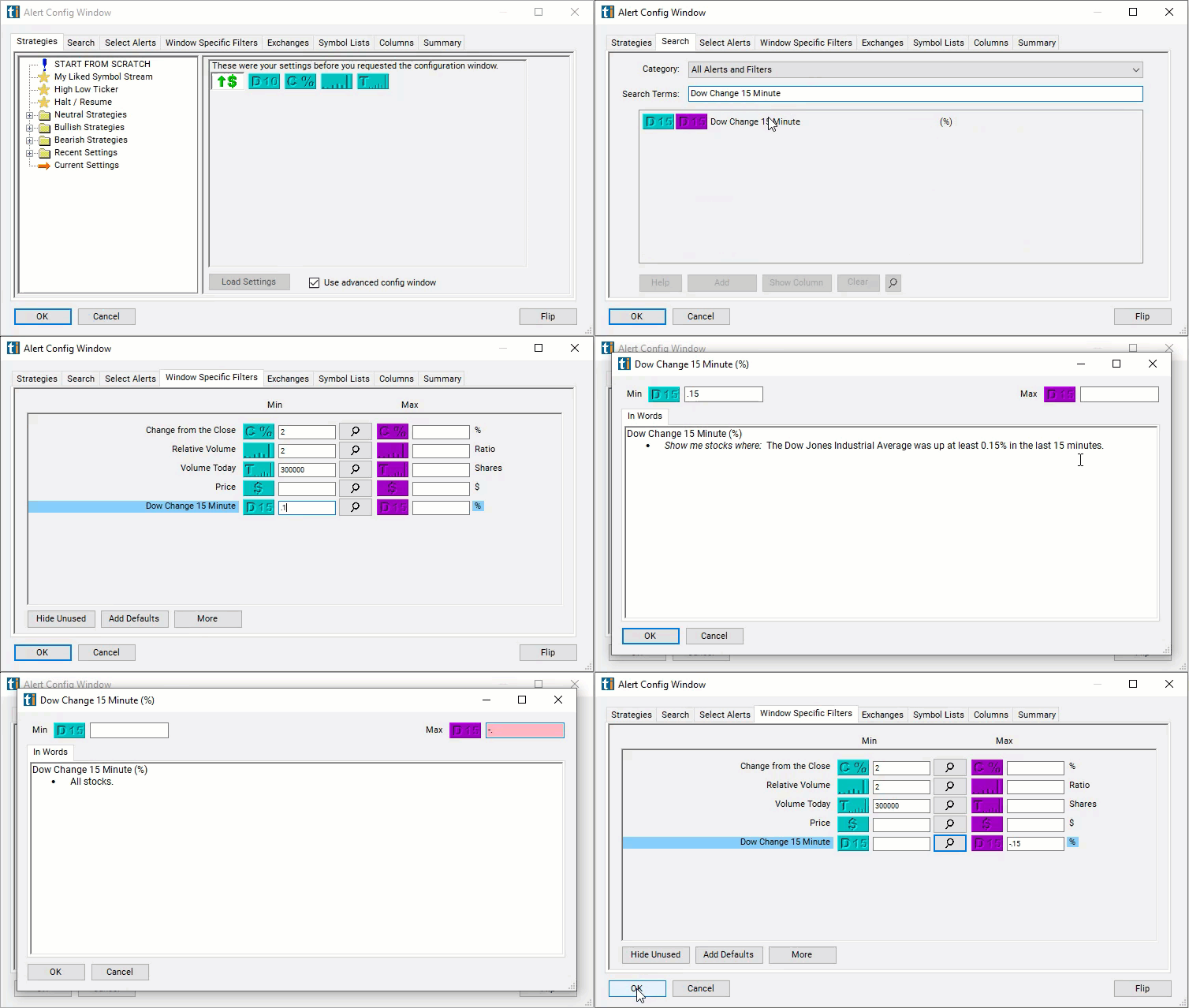
The settings of each Trade Ideas filter are defined in the Window Specific Filters Tab located in the Configuration Window of your Alert or Top List (Screener) window. Use a positive number to see a market which is moving up. Use a negative number to see a market which is moving down. For example, set the max to 0.05 and the min to -0.05 to see a market which is very flat. Use a min of 0.15 to see a market which is moving up. Use a max of -0.15 to see a market which is moving down.
These filters are all measured in percent, not dollars. Some people use an index to watch the market. Other people use the futures, the e-mini futures, or an ETF. These will all have different values, but the percent change will be the same for all of them.
Using the Dow Change (15 min) Filter
Several trading strategies can be employed with the Dow Change (15 min) filter to capitalize on short-term price movements. Here are some common strategies:
- Momentum Trading: Identify stocks that have experienced a significant price increase over the past fifteen minutes. Enter long positions on these stocks, expecting the momentum to continue in the short term.
- Pullback Trading: Wait for stocks that have experienced a sharp decline in price over the past fifteen minutes, indicating a potential pullback. Enter long positions if the stock shows signs of stabilizing or reversing its downward trend.
- Breakout Trading: Look for stocks that have broken out of a trading range or consolidation pattern with a significant price increase over the past fifteen minutes. Enter long positions if the breakout is confirmed, expecting the stock to continue moving in the breakout direction.
- Reversal Trading: Identify stocks that have experienced a sudden reversal in price direction over the past fifteen minutes. Enter positions opposite to the recent price movement, expecting the stock to retrace or reverse its recent trend.
Filters to combine with Dow Change (15 min)
Categories
FAQ
How do I only take long trades when the market is going up?
Add the Dow Change (15 min) filter (Dia15) to a Trade Ideas Streaming Alerts or Top List (Screener) window. Set the max to 0.05 and the min to -0.05 to see a market which is very flat. Use a min of 0.15 to see a market which is moving up.
What is the Dow Change (15 min) filter?
The Dow Change (15 min) filter measures the Dow Jones Industrial Average's percent change over the last 15 minutes. Every stock gets the same value at a given moment, so it acts as a market-direction filter, not a stock filter.
How can I filter stock alerts by market direction?
Use the Dow Change (15 min) filter (Dia15) in Trade Ideas Streaming Alerts and Top Lists to get alerts only when the Dow Jones Industrial Average is moving up, down, or flat over the last 15 minutes. The Dow Change (15 min) filter measures the Dow Jones Industrial Average's percent change over the last 15 minutes.