







 15SmaLa5
Filter
Change From 5 Period SMA (15m) Filter (15SmaLa5)
Find stocks trading above or below the 5-period moving average on the 15-minute chart in real time with Trade Ideas Streaming Alerts (Scanner) and Top Lists (Screeners). The Change From 5 Period SMA (15 min) filter compares the last print to the 5-period simple moving average on a 15-minute chart, in percent. Positive means above the average.
See the cross when it happens, not on tomorrow’s chart.
Free account, just an email. No card. Live access for a limited time.
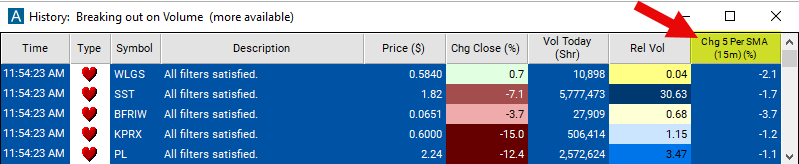
Streaming Alerts check the Change From 5 Period SMA (15 min) filter the moment each alert fires, and Top Lists can sort by it.
How Trade Ideas finds it: set the min value to 1 to see only stocks in which the current price is above their 5 period SMA on a 15 minute chart. Set the max value to -1 to see only stocks in which the current price is below their 5 period SMA on a 15 minute chart. See Trade Ideas plans and pricing to run it live.
How the Change From 5 Period SMA (15 min) filter works
The "Change From 5 Period SMA (15 minute)" filter in stock trading is used to compare the price of the last print for a stock to that of the 5 period simple moving average on a 15-minute chart. This filter is designed for short-term, intraday trading analysis due to its focus on small time increments. Here's how it's constructed and used:
Simple Moving Average (SMA)
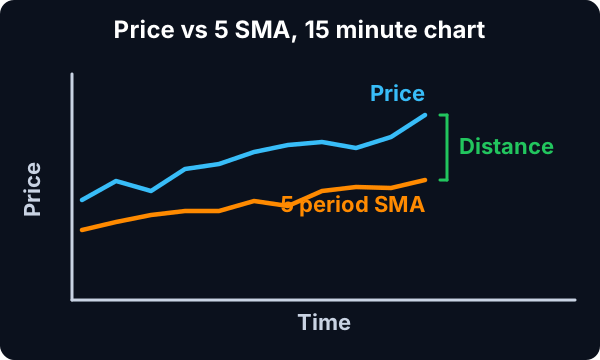
- 5-Period SMA: This is an average of the stock's closing prices over the last 5 periods, where each period is 15 minutes long. In other words, it's the average closing price of the stock over the last 75 minutes of trading.
- Dynamic Indicator: Dynamic and Responsive: The 5-period SMA on a 15-minute chart is more responsive than longer SMAs but less volatile than shorter period SMAs or those calculated on smaller timeframe charts.
- Calculation: The values entered for this filter are percentage (%). The formula is (Percent Change) = ((Last Price) - (SMA)) / (SMA) * 100.
A positive number means that the current price is above the moving average. A negative number means the current price is below the moving average.
Change From 5 Period SMA (15 min) filter settings
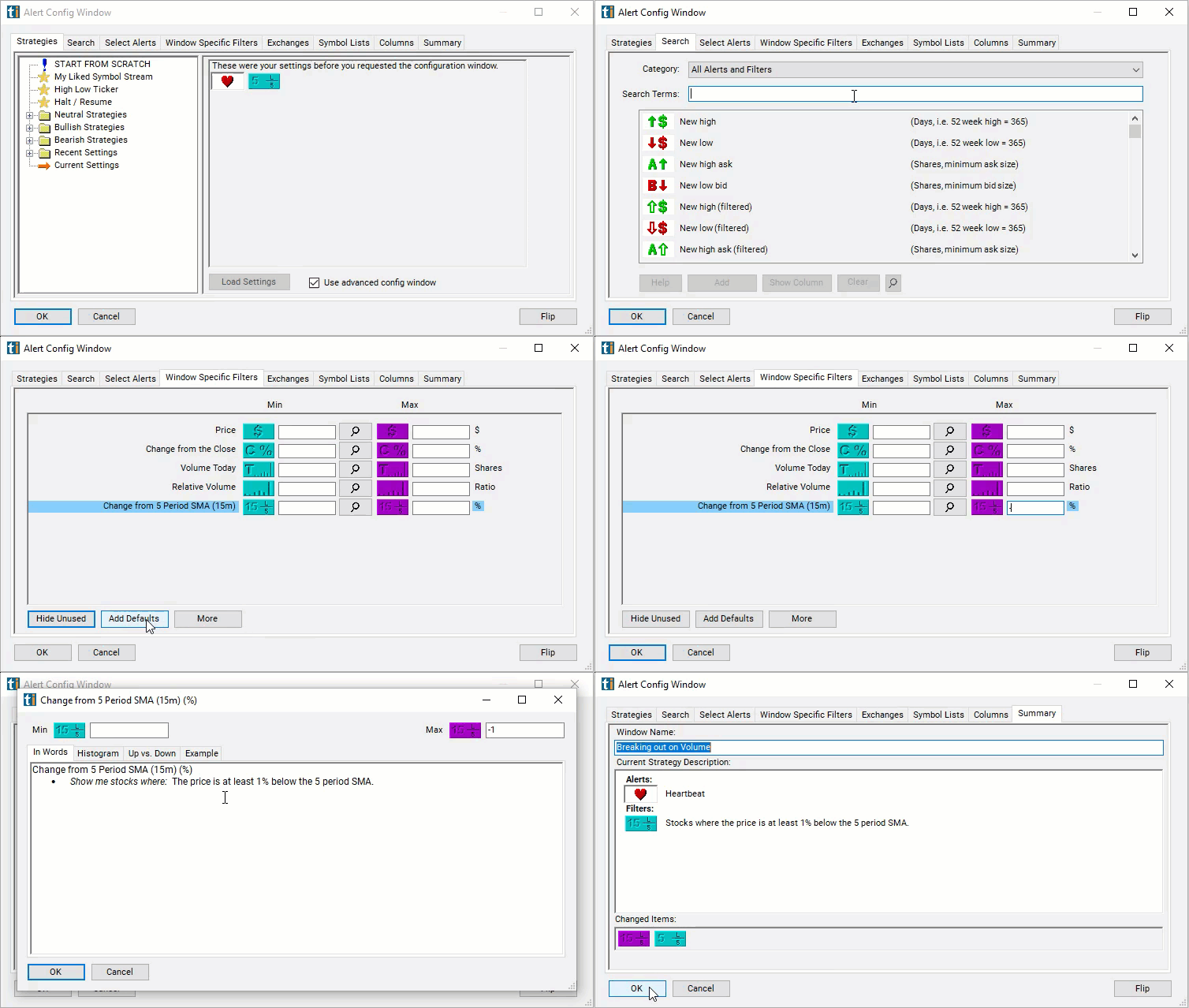
The settings of each Trade Ideas filter are defined in the Window Specific Filters Tab located in the Configuration Window of your Alert or Top List (Screener) window.
Here is how to setup the filter in your configuration window:
- Set the min value to 1 to see only stocks in which the current price is above their 5 period SMA on a 15 minute chart.
- Set the max value to -1 to see only stocks in which the current price is below their 5 period SMA on a 15 minute chart.
Using the Change From 5 Period SMA 15m Filter
Several trading strategies can be employed with the Change From 5 Period SMA 15m filter. Here are a few examples:
- Trend Identification: Traders use this filter to quickly determine if a stock is currently experiencing short-term upward or downward momentum, which can guide intraday trading decisions.
- Momentum-Based Entries and Exits: A positive change may prompt momentum traders to take long positions, while a negative change might lead them to sell or take short positions.
- Mean Reversion Strategies: If a stock deviates significantly from its 5-period SMA, some traders might anticipate a reversion to the mean and trade in the opposite direction of the deviation.
- Combination with Other Indicators: To enhance its effectiveness and reduce the likelihood of false signals, this filter is often used with other technical indicators such as volume, MACD, or RSI.
Filters to combine with Change From 5 Period SMA (15 min)
Categories
FAQ
Which stocks are above their 5-period moving average on the 15-minute chart?
Add the Change From 5 Period SMA (15 min) filter (15SmaLa5) to a Trade Ideas Streaming Alerts or Top List (Screener) window. Set the min value to 1 to see only stocks in which the current price is above their 5 period SMA on a 15 minute chart. Set the max value to -1 to see only stocks in which the current price is below their 5 period SMA on a 15 minute chart.
What is the Change From 5 Period SMA (15 min) filter?
The Change From 5 Period SMA (15 min) filter compares the last print to the 5-period simple moving average on a 15-minute chart, in percent. Positive means above the average.
How do I scan for stocks above an intraday moving average?
Use the Change From 5 Period SMA (15 min) filter (15SmaLa5) in Trade Ideas Streaming Alerts and Top Lists to find stocks trading above or below the 5-period moving average on the 15-minute chart. The Change From 5 Period SMA (15 min) filter compares the last print to the 5-period simple moving average on a 15-minute chart, in percent.