







 PEU15
▲ Bullish
PEU15
▲ Bullish
Streaming Alert (Scanner)
15 Minute Linear Regression Up Trend Alert (PEU15)
Find stocks turning into a 15-minute linear regression uptrend in real time with Trade Ideas Streaming Alerts (Scanner). Linear regression fits a statistical trend line to price over time. This alert fires when short-term regression momentum moves a stock across its longer-term regression channel upward on the 15 minute chart.
Stocks making a run, up and down.
Free account, just an email. No card. Live access for a limited time.
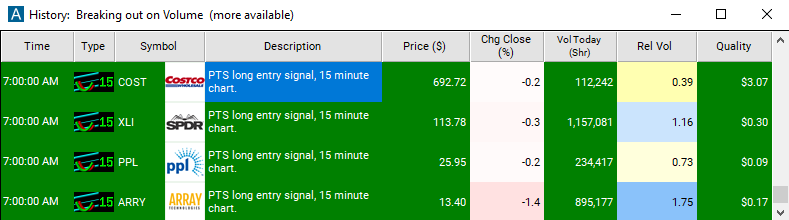
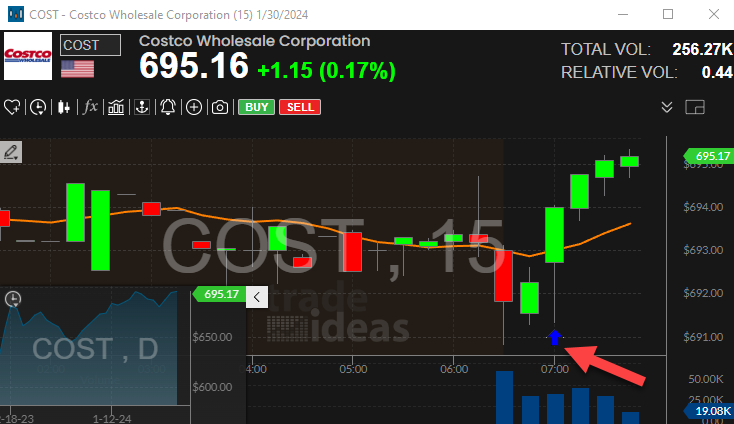
Streaming Alerts push each 15 Minute Linear Regression Up Trend alert the moment it triggers.
How Trade Ideas finds it: by default, the '15 Minute Linear Regression Uptrend' alert will appear when the linear regression analysis indicates that the stock price is moving in an upward direction. See Trade Ideas plans and pricing to run it live.
How the 15 Minute Linear Regression Up Trend alert works
For each stock we perform short and long term linear regression analysis. We use the longer term linear regression to form a channel, and tell us where the stock is likely to move. We use the shorter term linear regression to show us the stock's current momentum. When a stock starts moving from one side of the channel to the other, we report an alert.
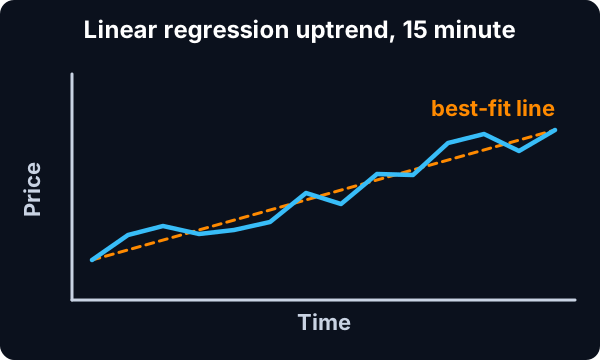
Linear regression is a statistical method used to model the relationship between two variables, typically the price of a stock and time. When applied to stock trading, linear regression can help identify trends and patterns in the price movement of a stock over time.
Key point
A "linear regression uptrend alert" is a notification triggered when the linear regression analysis indicates that the stock price is moving in an upward direction with a certain degree of significance. This means that the slope of the linear regression line is positive, indicating that the stock's price is generally increasing over time.
Traders often use uptrend alerts as a signal to potentially buy or hold onto a stock, as it suggests that the stock's price is likely to continue rising in the near future.
Here's how it works:
- Data Collection: Traders gather historical price data for a particular stock, usually over a specific time frame, such as weeks, months, or years.
- Calculation of Linear Regression Line: Using this historical price data, a linear regression line is calculated. This line represents the best-fit straight line through the data points, minimizing the overall distance between the line and the actual data points.
- Interpretation of the Slope: If the slope of the linear regression line is positive, it indicates an uptrend. This means that, on average, the stock's price has been increasing over the analyzed period.
- Confirmation and Decision Making: Traders often use the presence of a linear regression uptrend as one of many factors in their decision-making process. It may confirm their bullish sentiment or prompt them to consider buying opportunities.
Default settings
By default, the '15 Minute Linear Regression Uptrend' alert will appear when the linear regression analysis indicates that the stock price is moving in an upward direction. To align with each alert, it's essential to utilize the corresponding time frame on the chart. For instance, this alert is visualized on the 15-minute candlestick chart.
Custom settings
Settings
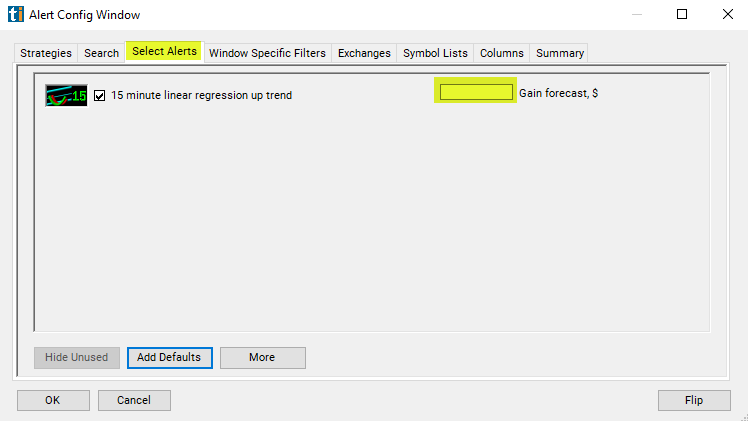
For '15 Minute Linear Regression Uptrend' alerts, you have the option to use an alert specific filter. This filter is located immediately to the right of the corresponding alert and is always optional. You can decide to leave it blank if you want to receive more alerts, or you can fill it in to restrict the number of alerts you receive. This filter allows you to specify the quality of the alert. When you set a higher number for this filter, you are telling the alerts server to display only alerts that meet a higher quality standard, resulting in fewer alerts being shown.
When setting an alert for '15 Minute Linear Regression Uptrend', the user can filter the alert by dollars per share. Each entry signal comes with a forecast of how far the stock will move, in dollars per share. By default you see all signals. By specifying a value for this filter, you will only see stocks expected to move more than that value.
What the alert shows you
Key point
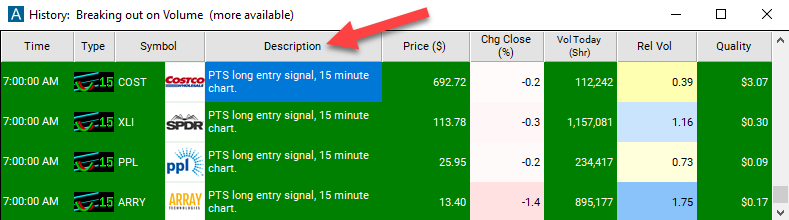
The alert's description will provide details on a long entry signal, including the timestamp of the last reported signal.
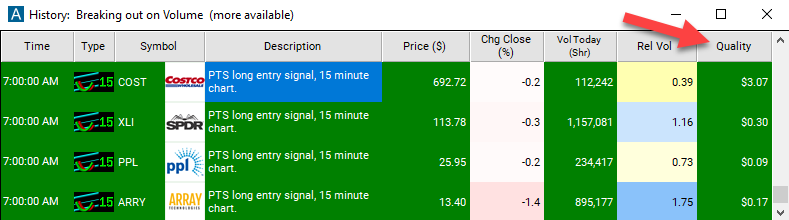
The quality value on a scan using the '15 Minute Linear Regression Uptrend' represents the amount of room left in the channel.
Related alerts
Filters to pair with the 15 Minute Linear Regression Up Trend alert
Categories
FAQ
Find stocks starting a new uptrend on the 15 minute chart?
Turn on the 15 Minute Linear Regression Up Trend alert (PEU15) in Trade Ideas Streaming Alerts. By default, the '15 Minute Linear Regression Uptrend' alert will appear when the linear regression analysis indicates that the stock price is moving in an upward direction.
What is the 15 Minute Linear Regression Up Trend alert?
Linear regression fits a statistical trend line to price over time. This alert fires when short-term regression momentum moves a stock across its longer-term regression channel upward on the 15 minute chart.
How do I see fewer, higher-quality 15 Minute Linear Regression Up Trend alerts?
Use the optional alert-specific filter immediately to the right of the alert. A higher number tells the alerts server to show only higher-quality alerts, so fewer appear. Leave it blank to see more.