







 RCon
RCon
Filter
Position in Consolidation Filter (RCon)
Find stocks breaking out of a consolidation range, or still sitting inside it, in real time, with Trade Ideas Streaming Alerts (Scanner) and Top Lists (Screeners). The Position in Consolidation filter shows where the current price sits within the stock's recent consolidation range, as a percent. Above 100 means it has broken out above the range.
Stocks making a run, up and down.
Free account, just an email. No card. Live access for a limited time.
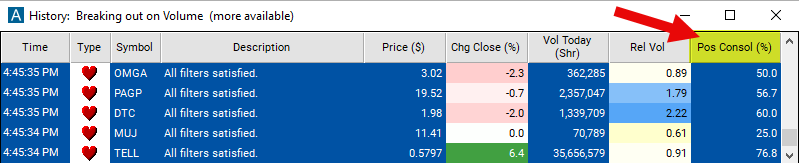
Streaming Alerts check the Position in Consolidation filter the moment each alert fires, and Top Lists can sort by it.
How Trade Ideas finds it: adjust the minimum value to 0 and the maximum to 100 to see stocks which have been consolidating, and are still trading in the same range today. See Trade Ideas plans and pricing to run it live.
How the Position in Consolidation filter works
The "position in consolidation" filter in stock trading assesses where a particular stock's current price stands within its recent consolidation range. Consolidation refers to a phase in which a stock's price moves within a relatively narrow range after experiencing a significant price movement. This filter helps traders identify whether a stock is near the upper boundary (resistance) or lower boundary (support) of its consolidation range.
Trader tip
A higher number indicates that the stock is closer to the upper boundary, suggesting potential resistance, while a lower number suggests that the stock is closer to the lower boundary, indicating potential support. Traders can use this filter to gauge the likelihood of a breakout or breakdown from the consolidation range and make informed trading decisions based on the stock's position within that range.
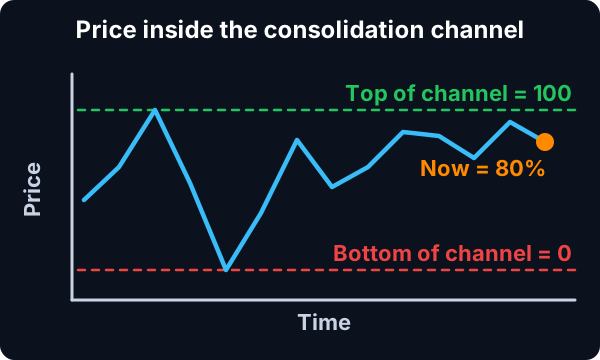
This filter is based on the same 40 day chart and the same chart pattern as the 'Consolidation' filter.
Position in Consolidation filter settings
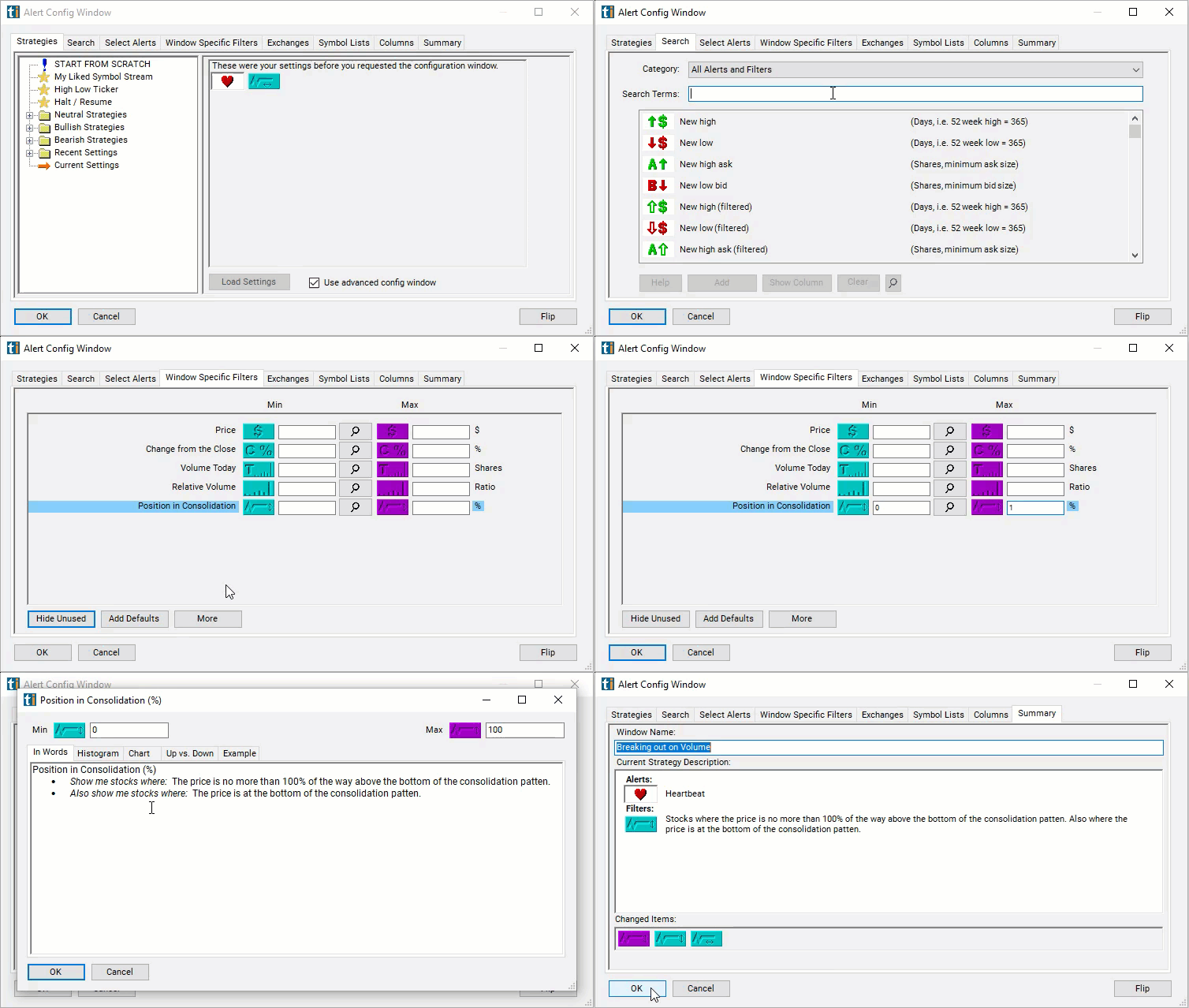
Configuring the "Position in Consolidation" filter is simple and can be done within the Window Specific Filters Tab of the Configuration Window in your Alert or Top List (Screener) window.
Here's how to set up the filter in your configuration window:
- Adjust the minimum value to 0 and the maximum to 100 to see stocks which have been consolidating, and are still trading in the same range today.
- Set the minimum to 100.01 to see only stocks which were consolidating, but have broken out of that range.
- Set the minimum to 0 and maximum of 15 to see stocks which have not broken out of their consolidation pattern yet, but are trading in the bottom 15% of the consolidation pattern.
Using the Position in Consolidation Filter
The "Position in Consolidation" filter can be used in various trading strategies, including:
- Breakout Trading: Traders may look for stocks positioned near the upper boundary of the consolidation range and anticipate a breakout above resistance. They may enter long positions once the stock price breaks out of the consolidation range, aiming to capitalize on potential upward momentum.
- Pullback Trading: Traders may wait for stocks positioned near the lower boundary of the consolidation range and anticipate a pullback towards support. They may enter long positions when the stock price retraces back to support levels within the consolidation range, expecting a bounce and potential upward movement.
- Range Trading: Traders may take advantage of the stock's oscillation within the consolidation range by buying near support and selling near resistance. They may enter long positions when the stock price approaches support and exit or short positions when it nears resistance, profiting from the price movements within the consolidation range.
- Volatility Breakout Trading: Traders may anticipate a significant price movement following a period of consolidation by monitoring volatility indicators. They may enter positions when volatility expands, indicating a potential breakout or breakdown from the consolidation range, and trade in the direction of the breakout.
Filters to combine with Position in Consolidation
Alerts to pair with the Position in Consolidation filter
FAQ
Which stocks are breaking out of a consolidation right now?
Add the Position in Consolidation filter (RCon) to a Trade Ideas Streaming Alerts or Top List (Screener) window. Adjust the minimum value to 0 and the maximum to 100 to see stocks which have been consolidating, and are still trading in the same range today.
What is the Position in Consolidation filter?
The Position in Consolidation filter shows where the current price sits within the stock's recent consolidation range, as a percent. Above 100 means it has broken out above the range.
How do I find consolidation breakouts?
Use the Position in Consolidation filter (RCon) in Trade Ideas Streaming Alerts and Top Lists to find stocks breaking out of a consolidation range, or still sitting inside it. The Position in Consolidation filter shows where the current price sits within the stock's recent consolidation range, as a percent.