







 QEarnG
Filter
Quarterly Earnings Growth Filter (QEarnG)
Find earnings growth stocks, by year-over-year quarterly earnings growth, in real time, with Trade Ideas Streaming Alerts (Scanner) and Top Lists (Screeners). Quarterly Earnings Growth is the percent change in a company's earnings compared with the same quarter 12 months ago.
Watch the market turn, stock by stock.
Free account, just an email. No card. Live access for a limited time.
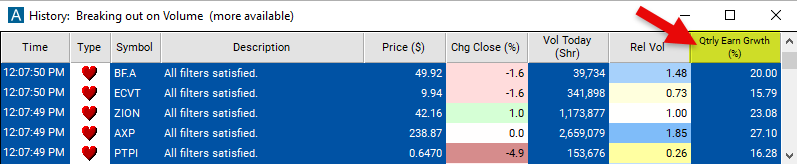
Seeing an earnings-growth stock start to move as it happens helps active traders. The Quarterly Earnings Growth filter value changes once a day, so Streaming Alerts apply it the moment each alert fires: you see only the stocks that pass it, while they are moving.
How Trade Ideas finds it: set the minimum value to 10 to see only stocks where quarterly earnings are up at least 10% from last year. Set the maximum value to -10 to see only stock where quarterly earnings are down at least 10% from last year. See Trade Ideas plans and pricing to run it live.
How the Quarterly Earnings Growth filter works
Quarterly Earnings Growth is a financial metric used to measure the percentage change in a company's earnings using year over year data comparing the current earnings to that of 12 months ago. It measures the percentage increase or decrease in earnings over a three-month period, providing insight into the company's performance on a quarterly basis.
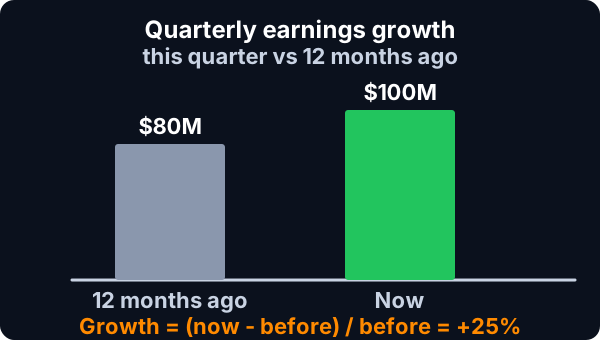
Calculation: The formula for Quarterly Earnings Growth is: Current quarter earnings−Earnings from same quarter last year / earnings from the same quarter last year x 100
Key point
Interpretation: A positive QEG indicates earnings growth, meaning the company earned more in the current quarter compared to the same quarter last year. A negative QEG suggests earnings decline, indicating the company earned less in the current quarter compared to the same quarter last year. The magnitude of QEG reflects the percentage change in earnings over the year, providing insight into the company's earnings performance and growth trajectory.
Quarterly Earnings Growth filter settings
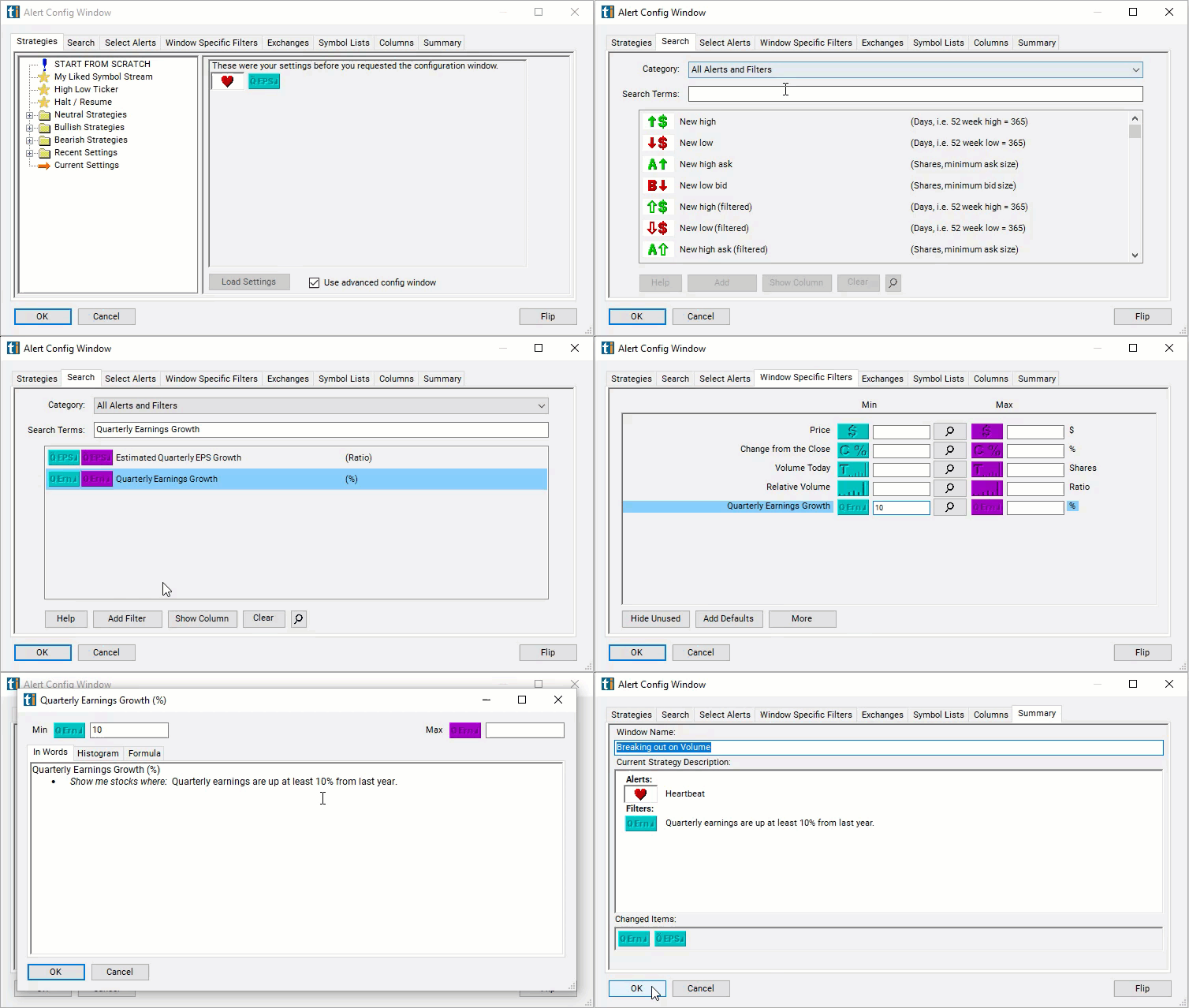
Configuring the "Quarterly Earnings Growth" filter is simple and can be done within the Window Specific Filters Tab of the Configuration Window in your Alert or Top List (Screener) window.
Here's how to set up the filter in your configuration window:
- Set the minimum value to 10 to see only stocks where quarterly earnings are up at least 10% from last year.
- Set the maximum value to -10 to see only stock where quarterly earnings are down at least 10% from last year.
Using the Quarterly Earnings Growth Filter
The "Quarterly Earnings Growth" filter can be used in various trading strategies, including:
- Momentum Trading: Identify stocks with high Quarterly Earnings Growth rates, indicating strong earnings momentum. Take long positions in these stocks to capitalize on potential price appreciation resulting from positive earnings surprises. Utilize technical analysis tools to identify trends and entry/exit points for trades.
- Contrarian Strategy: Identify stocks with low Quarterly Earnings Growth rates relative to market expectations. Evaluate whether the market may be underestimating their growth potential, leading to potential buying opportunities. Take contrarian positions in stocks with favorable long-term prospects but temporarily depressed growth expectations.
- Volatility Trading: Use Quarterly Earnings Growth as a volatility indicator. Stocks with high growth rates may experience greater price volatility around earnings announcements. Implement options strategies such as straddles or strangles to capitalize on potential volatility spikes.
Filters to combine with Quarterly Earnings Growth
Categories
FAQ
Which stocks have the strongest earnings growth?
Add the Quarterly Earnings Growth filter (QEarnG) to a Trade Ideas Streaming Alerts or Top List (Screener) window. Set the minimum value to 10 to see only stocks where quarterly earnings are up at least 10% from last year. Set the maximum value to -10 to see only stock where quarterly earnings are down at least 10% from last year.
What is the Quarterly Earnings Growth filter?
Quarterly Earnings Growth is the percent change in a company's earnings compared with the same quarter 12 months ago.
How do I find earnings growth stocks?
Use the Quarterly Earnings Growth filter (QEarnG) in Trade Ideas Streaming Alerts and Top Lists to find earnings growth stocks, by year-over-year quarterly earnings growth. Quarterly Earnings Growth is the percent change in a company's earnings compared with the same quarter 12 months ago.