







 PostP
PostP
Filter
Change Post Market Filter (PostP)
Find after-hours movers: stocks up or down since the end of the regular trading session, in percent, in real time, with Trade Ideas Streaming Alerts (Scanner) and Top Lists (Screeners). The Change Post Market (%) filter measures the move between the current price and the close of the regular trading session, in percent.
Stocks making a run, up and down.
Free account, just an email. No card. Live access for a limited time.
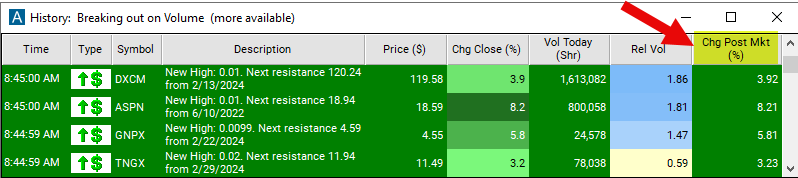
Streaming Alerts check the Change Post Market (%) filter the moment each alert fires, and Top Lists can sort by it.
How Trade Ideas finds it: set the min value to 3 to see stocks which are at least 3% above where they were at the end of the regular trading session. See Trade Ideas plans and pricing to run it live.
How the Change Post Market filter works
Trader tip
The "change post-market (%)" filter refers to the difference between the current price of a stock and its closing price during the post-market trading session, measured in percentage. This filter provides traders with information about how much the stock price has moved since the end of the regular trading session. Note that viewing this filter outside during regular hours, or pre-market session, will show the change from the previous close.
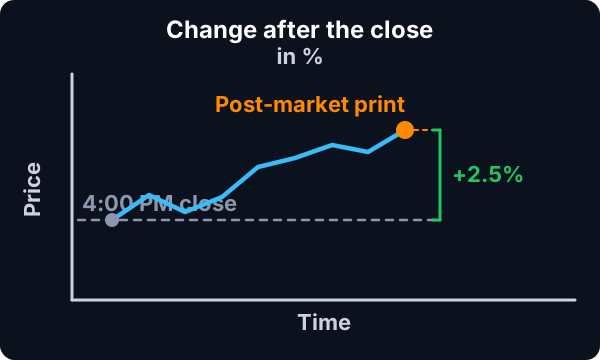
Change Post Market filter settings
The settings of each Trade Ideas filter are defined in the Window Specific Filters Tab located in the Configuration Window of your Alert or Top List (Screener) window.
Here is how to setup the filter in your configuration window:
- Set the min value to 3 to see stocks which are at least 3% above where they were at the end of the regular trading session.
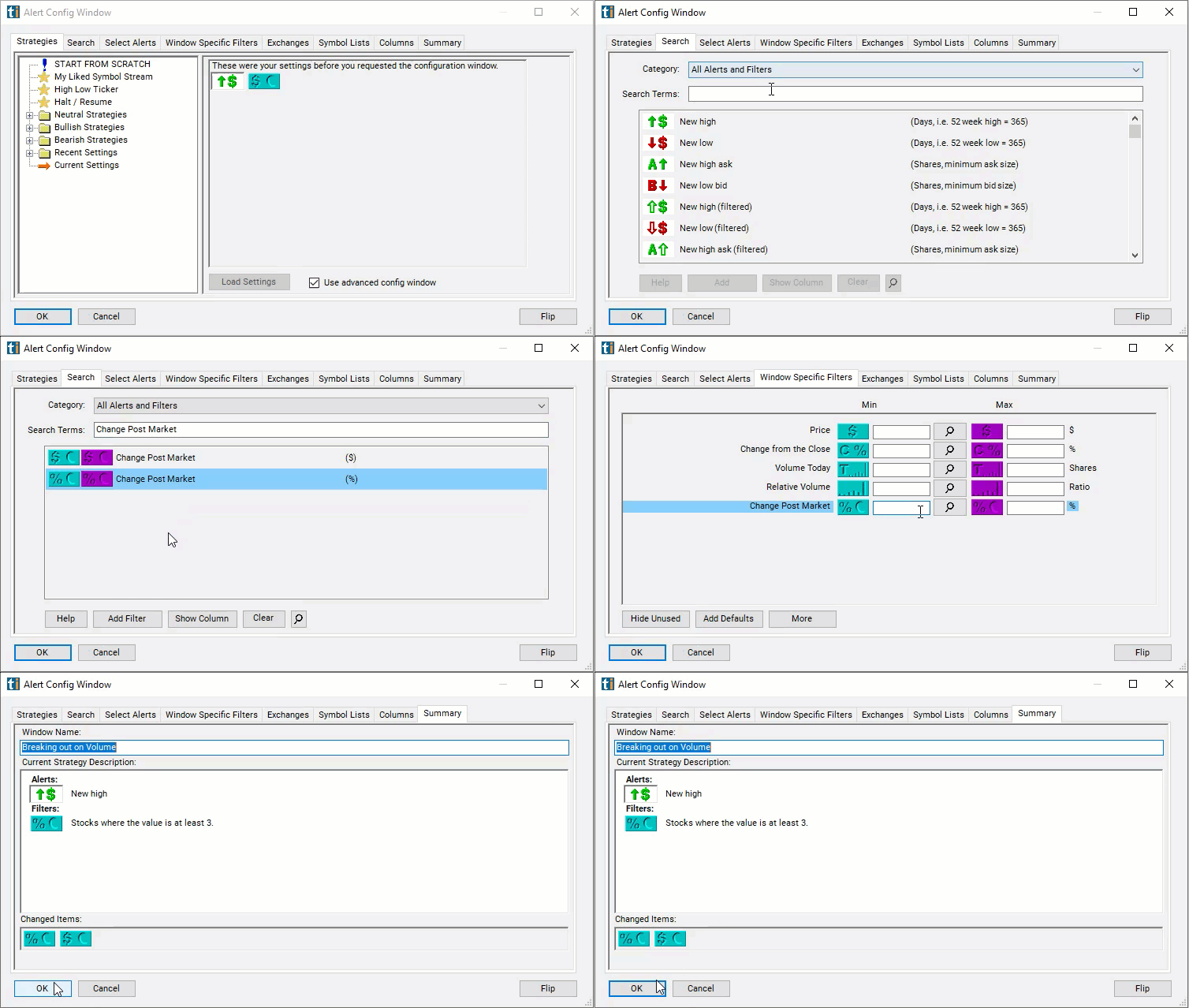
Using the Change Post Market Percent Filter
Several trading strategies can be employed with the Change Post Market Percent filter. Here are a few examples:
- Overnight Momentum Trading: This strategy involves identifying stocks with significant price movements in the post-market session and entering trades to capitalize on the momentum continuation into the next trading day. Traders can screen for stocks with large changes post-market and look for patterns indicating strong momentum. They may then enter long or short positions at the market open, depending on the direction of the price movement.
- Gap Trading: Gap trading involves trading stocks that exhibit price gaps between the previous close and the next day's open, often caused by significant news or events occurring after hours. Traders can use the "change post-market (%)" filter to identify stocks with large price gaps between the post-market close and the next day's open. They may then enter trades to exploit the price movement as the market reacts to the overnight news or events.
- Reversal Trading: Reversal traders aim to profit from price reversals that occur after significant moves in one direction. Traders can use the "change post-market (%)" filter to identify stocks that have experienced extreme price movements after hours. If the price movement appears overextended or unsustainable, traders may anticipate a reversal and enter trades in the opposite direction.
Filters to combine with Change Post Market
Alerts to pair with the Change Post Market filter
FAQ
Which stocks are moving after hours right now?
Add the Change Post Market filter (PostP) to a Trade Ideas Streaming Alerts or Top List (Screener) window. Set the min value to 3 to see stocks which are at least 3% above where they were at the end of the regular trading session.
What is the Change Post Market (%) filter?
The Change Post Market (%) filter measures the move between the current price and the close of the regular trading session, in percent.
How do I find after-hours movers?
Use the Change Post Market filter (PostP) in Trade Ideas Streaming Alerts and Top Lists to find after-hours movers: stocks up or down since the end of the regular trading session, in percent. The Change Post Market (%) filter measures the move between the current price and the close of the regular trading session, in percent.