







 AS
AS
Filter
Ask Size Filter (AS)
Find stocks with a large ask size, where sellers are stacked at the best offer, in real time, with Trade Ideas Streaming Alerts (Scanner). Ask size is the number of shares sellers are willing to sell at the current best ask price. The Ask Size filter screens by that share count.
Watch the bid and ask as they shift.
Free account, just an email. No card. Live access for a limited time.

Streaming Alerts check the Ask Size filter the moment each alert fires.
How Trade Ideas finds it: to scan for stocks with an Ask Size between 200 shares and 1000 shares, add the Ask Size filter and enter 200 in the minimum field and 1,000 in the maximum field. See Trade Ideas plans and pricing to run it live.
How the Ask Size filter works
- Analyzing Supply and Liquidity in Stock Trading -
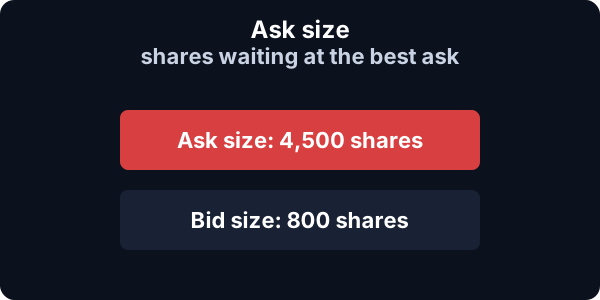
The Ask Size Filter allows traders to specify the desired range of ask sizes when scanning for stocks. The ask size refers to the number of shares that sellers are willing to sell at a specific ask price.
If the Ask Size is 700, it means that there are sellers willing to sell 700 shares at the specified ask price. The Ask Size Filter in Trade Ideas utilizes Level 1 market data.
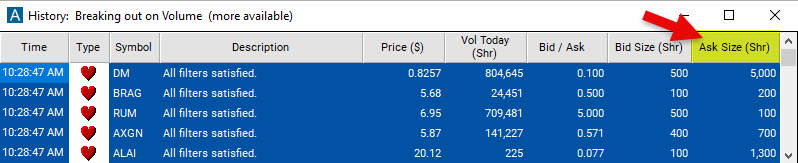
Key point
Ask sizes can change rapidly due to order placement, filling, or cancellation.
Comparing the bid size with the ask size helps gauge selling interest and supply levels. See the Bid/Ask Ratio Filter.
Ask Size filter settings
The settings of each Trade Ideas filter are defined in the Window Specific Filters Tab located in the Configuration Window of your Alert/Top List (Screener) Window.
Settings
The Ask Size Filter works by setting a minimum and/or maximum ask size value. When running a scan, stocks with ask sizes falling outside of the specified range will be excluded from the scan results. This filter helps traders narrow down their stock selection based on the level of supply available at different ask prices.
To scan for stocks with an Ask Size between 200 shares and 1000 shares, add the Ask Size Filter to your scan and enter 200 in the minimum field and 1,000 in the maximum field in the Window Specific Filters Tab.
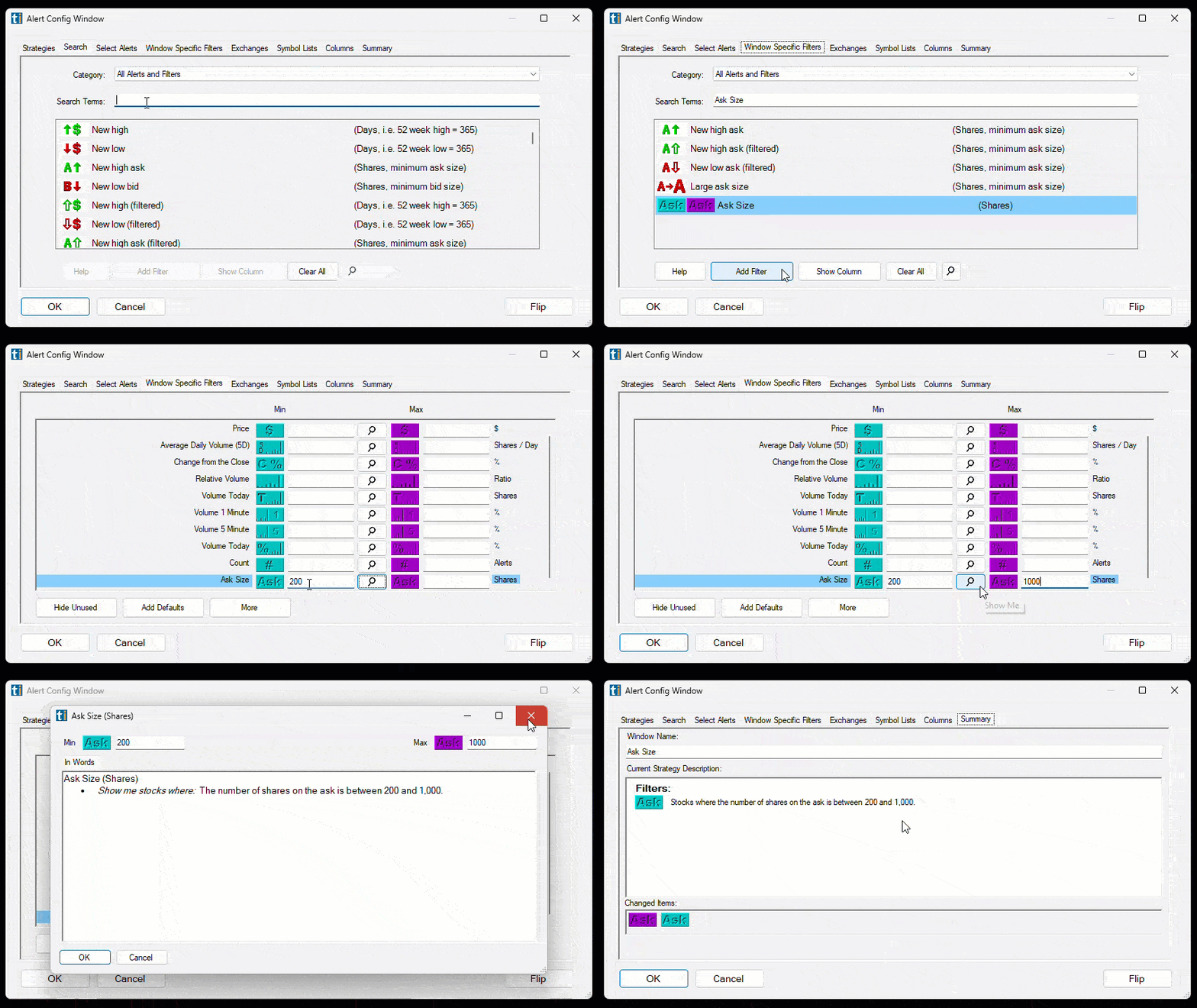
Using the Ask Size Filter
- Assessing Seller Interest -
Here are some examples of different ask sizes traders may consider in their trading:
- For stocks with high liquidity and significant trading volume, a trader might set a minimum ask size of 1,000 shares and a maximum ask size of 10,000 shares. This range ensures that the trader focuses on stocks with substantial supply and liquidity.
- If the trader is interested in mid-cap stocks, they may set a minimum ask size of 100 shares and a maximum ask size of 1,000 shares. This range is suitable for stocks with moderate liquidity and trading activity.
- Stocks with extremely small ask sizes may indicate limited seller interest or illiquid markets, so traders might want to exclude those stocks by setting a minimum Ask Size. By excluding lower ask sizes, a trader can focus on stocks where individual traders have a more significant impact on price movements.
- Traders who engage in short-term trading or scalping strategies often look for stocks with tighter bid-ask spreads and quick price movements. Excluding lower ask sizes may help filter out stocks with slower price action and focus on stocks with more dynamic price changes.
Filters to combine with Ask Size
Alerts to pair with the Ask Size filter
Categories
FAQ
Which stocks have big sellers on the ask right now?
Add the Ask Size filter (AS) to a Trade Ideas Streaming Alerts window. To scan for stocks with an Ask Size between 200 shares and 1000 shares, add the Ask Size filter and enter 200 in the minimum field and 1,000 in the maximum field.
What is the Ask Size filter?
Ask size is the number of shares sellers are willing to sell at the current best ask price. The Ask Size filter screens by that share count.
What does a large ask size mean?
Use the Ask Size filter (AS) in Trade Ideas Streaming Alerts to find stocks with a large ask size, where sellers are stacked at the best offer. Ask size is the number of shares sellers are willing to sell at the current best ask price.
What is the difference between the ask size filter and the bid size filter?
The ask size filter and the bid size filter are two distinct filters used in stock trading, and they provide different perspectives on supply and demand in the market. The ask size filter refers to the number of shares that sellers are willing to sell at a specific ask price.
The bid size filter refers to the number of shares that buyers are willing to buy at a specific bid price. Overall, the bid size filter focuses on assessing buying interest and demand levels from the perspective of the buyers, while the ask size filter concentrates on evaluating selling interest and supply levels from the perspective of the sellers.
Traders can utilize both filters to gather information about supply and demand dynamics and make more informed trading decisions.
What is the Ask Size Filter primarily used for?
The ask size filter is primarily used to assess selling interest and the level of supply available in the market. It helps traders gauge the willingness of sellers to sell shares at specific ask prices. While the ask size filter itself does not directly identify potential buying opportunities, it provides valuable information about the liquidity and availability of stocks.
By analyzing the ask size and comparing it with other factors such as price, volume, and market conditions, traders can make informed decisions about potential buying opportunities. For example, a larger ask size may indicate higher supply and potential resistance levels, which could suggest a more challenging buying opportunity. On the other hand, a smaller ask size may suggest limited supply and the potential for price appreciation, which could be viewed as a more favorable buying opportunity.
Can the ask size filter be used to identify potential short-selling opportunities?
Short-selling, which involves selling borrowed shares with the expectation of buying them back at a lower price, is not directly related to the ask size filter. Short-selling typically focuses on identifying overvalued stocks or stocks with downward price trends. Traders interested in short-selling may consider factors such as bid size, price movement, and other indicators specific to short-selling strategies.
How does the ask size filter interact with other filters, such as the volume filter?
The ask size filter and the volume filter are two different technical analysis tools that can be used to identify potential trading opportunities. The ask size filter refers to the number of shares that sellers are willing to sell at a specific ask price. The volume filter refers to the total number of shares that have been traded in a given period of time.
When used together, the ask size filter and the volume filter can provide a more complete picture of the market. For example, if a stock has a large ask size but a low volume, this could be a sign that there is not enough buying interest to support the price. On the other hand, if a stock has a large ask size and a high volume, this could be a sign that there is strong buying interest and that the price is likely to rise.
Here are some specific examples of how the ask size filter and the volume filter can interact:
- A large ask size and a low volume could indicate that the stock is illiquid. In this case, it may be difficult to buy or sell the stock without moving the price significantly.
- A large ask size and a high volume could indicate that the stock is under pressure. In this case, the price may be likely to decline as sellers try to unload their shares.
- A small ask size and a high volume could indicate that the stock is in demand. In this case, the price may be likely to rise as buyers try to acquire the stock.
How do multiple filters and alerts work together with the Ask Size Filter?
When multiple filters are applied in a scan, they work as "ANDs" meaning that all the filters need to be satisfied by a stock for it to be included in the scan results.
When multiple alerts are used in a scan, they work as "ORs" indicating that only one of the alerts, along with satisfying all the filters, needs to be met for a stock to appear in the scan results.
Do you have step-by-step tutorials on how to build scans?
Please watch the following three short videos on how to create Alert and Top List (Screener) Windows Scans in Trade Ideas:
Video: Episode 7 - Difference between Top List and Alert Windows